Invoice hygiene
The late payment you accidentally caused (it happens to everyone)
We spend a lot of time on this blog talking about clients who pay late. Today, some uncomfortable balance: sometimes the reason an invoice sits unpaid for three weeks is... the invoice.
Not the client's cash flow. Not their intentions. A typo'd email address. A missing PO number. A total that doesn't match the quote. An invoice with no due date, addressed to "the company" instead of the one person whose job it is to pay it.
Nobody tells you this happened, either. Rejected or confusing invoices don't bounce back with a helpful error message — they just go quiet. You wait, assume the client is slow, and eventually send an awkward follow-up. The client checks, finds your invoice sitting in a coworker's inbox with a question mark next to the total, and now everyone's a little embarrassed and you're getting paid in week five instead of week two.
The stats here are humbling
This isn't an occasional fumble — errors are one of the dominant reasons invoices pay late:
- 61% of late payments are the result of errors in the invoice itself, according to research compiled by InvoPilot (citing Amalto) — wrong details, wrong amounts, missing information
- 11% of clients say they never received the invoice at all — wrong address, spam folder, or the wrong person entirely (InvoPilot)
- Depending on the study, up to 66% of invoices contain at least one error, and over 60% of those errors come from manual data entry — retyping names, rates, and totals into a document by hand
- On the receiving end, accounts payable teams catch only about 39% of invoice errors — the rest cause questions, disputes, and rework instead of getting quietly fixed
Read those together and a pattern appears: a huge share of "late payments" were never really payment problems. They were paperwork problems, created in the thirty seconds it took to copy last month's invoice and change the details. Mostly.
What a gets-paid-fast invoice actually contains
The fix is unglamorous: completeness. Here's the anatomy, annotated:
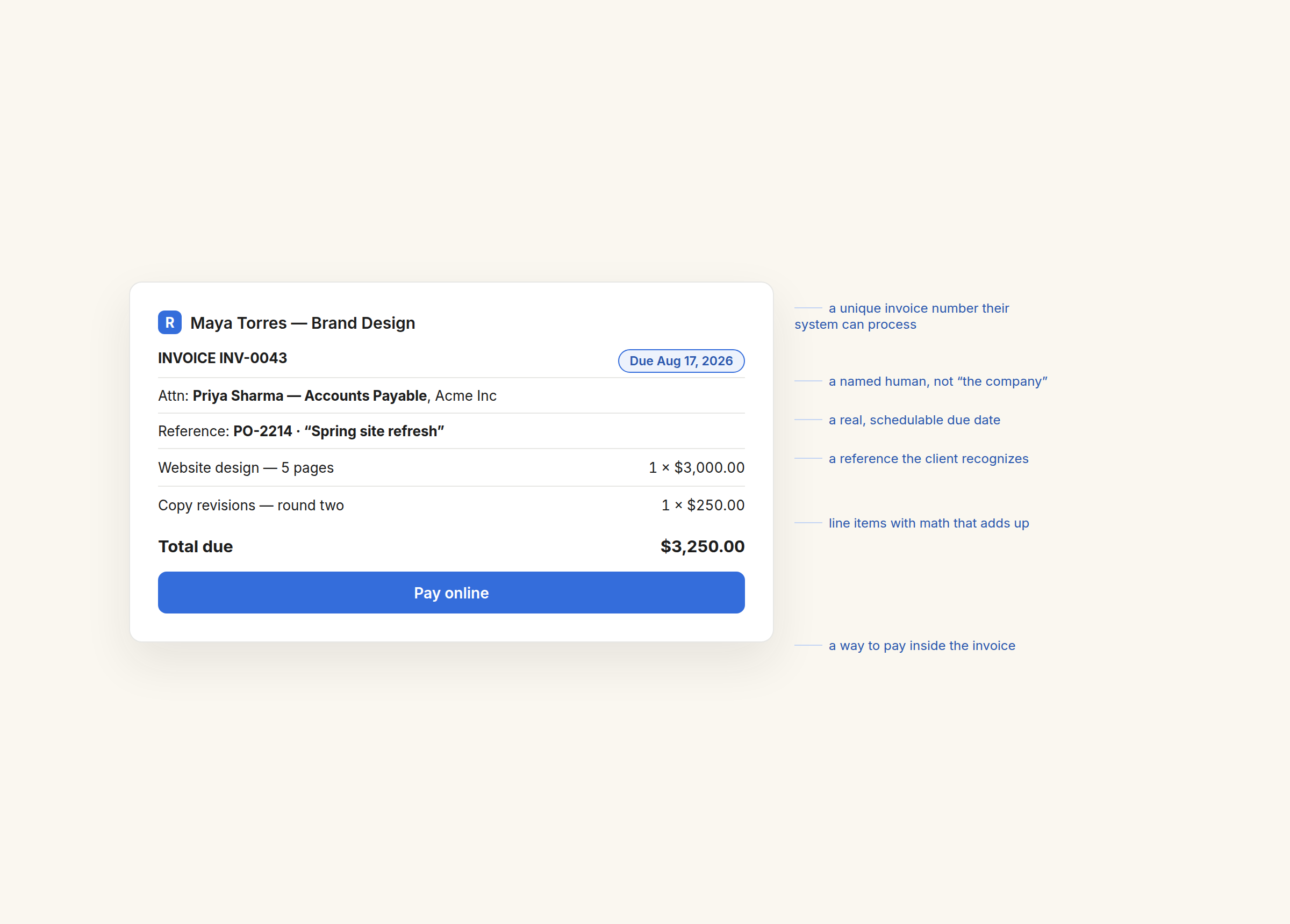
The parts that do the heavy lifting:
- A unique invoice number. Not for you — for their accounting system, which may literally be unable to process a payment without one. "Invoice (final) (2)" is not a number.
- A named recipient. "Attn: Priya — Accounts Payable" gets processed. An invoice addressed to a company drifts between inboxes. This one detail attacks both the 11%-never-received problem and the biggest cause of quiet delays: the right person never saw it.
- A specific due date. "Due August 17" is schedulable; "due on receipt" is a vibe. Vague terms consistently correlate with later payments.
- A reference the client recognizes. The project name or PO number they use internally, so nobody has to investigate what this charge is before approving it.
- The math, done right. Line items, quantities, rates, and a total that actually adds up — the single most common category of error when invoices are assembled by hand.
- A way to pay inside the invoice. Every step between "approved" and "paid" — finding bank details, filing a transfer — is another place the payment can stall for a week.
Where the tool comes in
You could keep all of that in your head and nail it every time in a Word template. Realistically, at 6 p.m. on invoice-sending day, you won't — that's how the 60%-manual-entry stat happens to smart people.
This is the quiet argument for a structured tool like RivitPay: the generator asks for the fields an invoice needs, numbers it, formats the currency properly (45 of them, if your client is abroad), does the arithmetic, and puts a Pay online button on the result so the payment happens where the invoice is. Card payments settle directly into your own Stripe account — we never hold your money.
And the "never received it" failure mode — the one that used to cost you a silent week — becomes visible: RivitPay shows you live when your client opens the invoice. No view after two days? Don't draft a diplomatic nudge; check the email address and resend. Viewed three times and unpaid? Different situation, different follow-up — and RivitPay's automatic reminders handle the routine nudges for you, in your own words. You can't fix what you can't see, and this is the part nobody could see before.
The two-minute audit
Before you send your next invoice, scan it once against that list: number, named person, due date, reference, math, payment method. Six checks, maybe two minutes — against a 61% chance that an error somewhere in the pile is what's actually delaying your money.
The generator asks for what an invoice needs, does the math, and shows you the moment it's opened.
Make an invoice — free, no signup