Tax
$60,000, 15% and no more "tax invoice": when New Zealand freelancers have to start charging GST
New Zealand's GST threshold is one number, $60,000, and most freelancers know it. What they don't always know is that it looks forward as well as back, that you can't add GST before you're registered, and that the "tax invoice" they were taught about has been replaced by something looser. If a few good contracts are pushing you toward $60,000, here's what changes and what your invoices need to show.
New Zealand clients pay quickly, but not on time
Xero's Small Business Insights for New Zealand, published on 29 October, found that small businesses waited an average of 25.4 days to be paid in the September quarter, 0.3 days longer than in the June quarter. Payments arrived an average of 5.2 days late, up 0.9 days. That's still the shortest late-payment time of the five countries Xero tracks, but Xero said the rise is "something that needs to be closely monitored in the coming months". Cash flow matters more once some of every payment is GST you owe Inland Revenue.
The test looks back and forward
Inland Revenue's registration page says you must register if you carry out a taxable activity and either "your turnover was at least $60,000 in the last 12 months, or you expect it will be at least $60,000 in the next 12 months". That's any 12 months, not the tax year. business.govt.nz says the same thing more bluntly: register "as soon as you think you’ll earn more than $60,000 in 12 months".
The forward test is the one freelancers miss. Say you're a copywriter in Wellington who has billed $41,000 over the past year, and you sign a 12-month retainer worth $4,000 a month. That's $48,000 over the next 12 months from the retainer alone, before your other clients. If the two together come to $60,000 or more, you meet the test the day you sign, even though you haven't invoiced a cent of the retainer yet.
The second trigger catches people too. IRD says you also must register if you "add GST to the price" of what you sell. You can't put GST on an invoice and keep it while you sort out registration. Below $60,000, registering is your choice. That can be worth it if your clients are GST-registered businesses that claim the GST back anyway, and you have costs of your own to claim.
15%, and what it does to your price
Once you're registered, you charge GST at 15% on most of what you sell. IRD gives both ways to do it: add it on, so $100 plus GST is $115, or include it, in which case 3/23 of a $100 price, $13.04, is GST you pay over. If you've been quoting $100 an hour and you keep quoting $100, you've just given yourself a 13% pay cut. Decide before your registration date which clients see "+ GST" on the next quote.
A GST-registered business client claims the 15% back, so $1,150 instead of $1,000 costs them nothing in the end. A private client, or a small business that isn't registered, pays the extra $150 for real.
Overseas clients are usually zero-rated
IRD's zero-rating guidance lists "Services supplied to non-residents outside New Zealand at the time the service is performed" as zero-rated, with the example of "a lawyer resident in New Zealand gives legal advice to a person living in Australia." Design for a company in Sydney or code for a startup in San Francisco usually works the same way: GST at 0%, not 15%.
Zero-rated isn't the same as outside the system. business.govt.nz notes that "Zero-rated supplies still have to be recorded on your GST returns", and they go in a different section of the return. For remote services, IRD says you need to be able to show your customer isn't a New Zealand resident, for example with two pieces of evidence such as their billing address and their bank details. Keep the client's overseas address on the invoice and you've got one of them.
"Taxable supply information" replaced the tax invoice
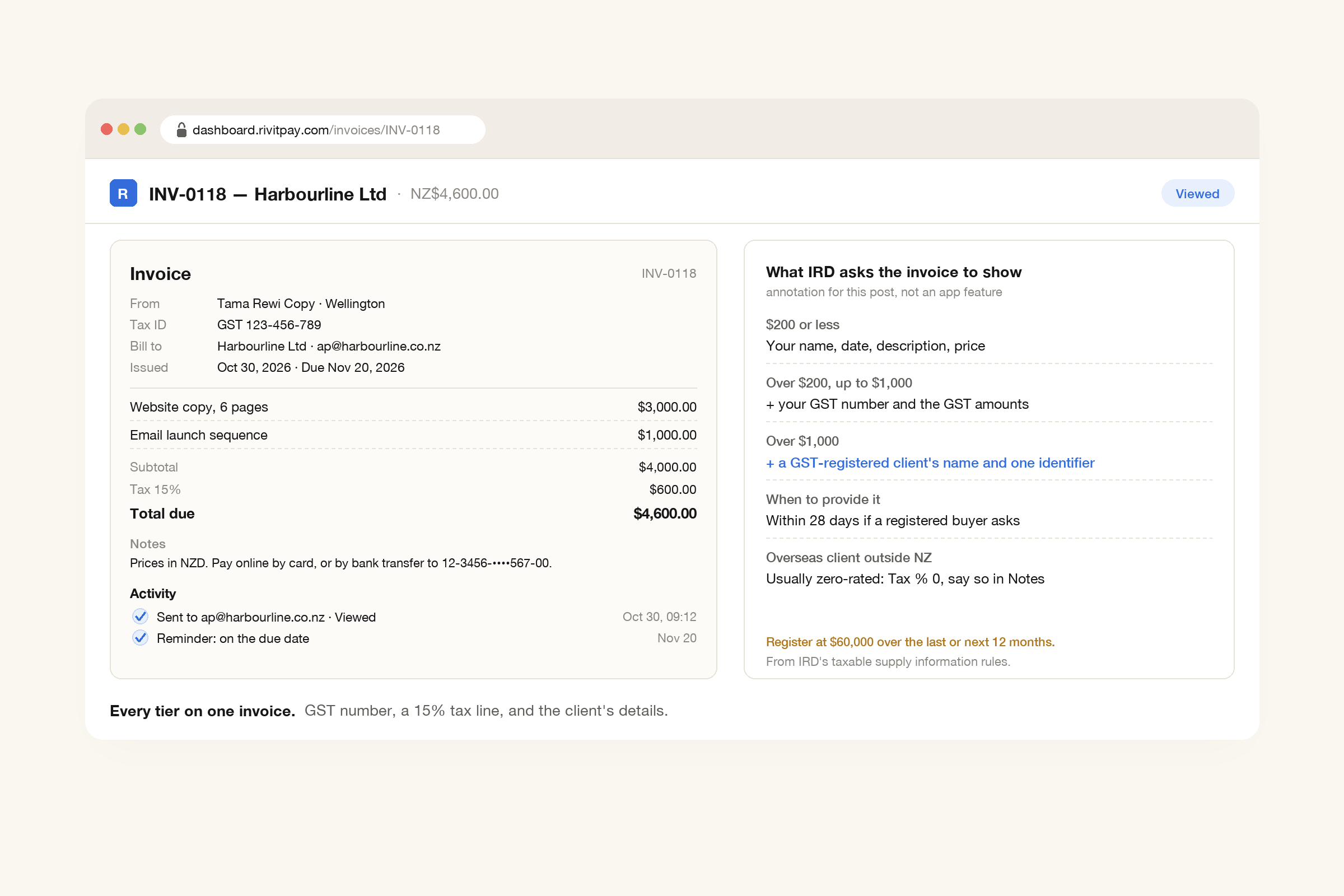
IRD puts it this way: in the past, you needed to keep a single document, like a tax invoice, as evidence of a transaction. Now, its page on taxable supply information says, "various records like invoices, bank statements, supplier agreements, and contracts can be used on their own, or in combination". What has to be shown depends on the amount:
- $200 or less: your name or trading name, the date, a description, and the price.
- Over $200 and up to $1,000: all of that plus your GST number, and either the amount excluding GST, the GST and the total, or the GST-inclusive total with a statement that GST is included.
- Over $1,000: all of that plus, if your client is GST-registered, their name and at least one identifier, such as their address, phone number, email, NZBN or website.
You have to provide it to a GST-registered buyer "within 28 days of a request" for supplies over $200. In practice, a normal invoice with your GST number, a GST line and your client's name and email covers every tier, and it's the easiest thing for their accountant to work with.
Where RivitPay fits
The free invoice generator, with no signup, covers all three tiers. Put your GST number in the Tax ID field and it prints under your details. Set Tax % to 15 and the invoice shows a subtotal, a "Tax 15%" line and the total, which is IRD's first option for showing GST. Your client's name, email and address go in the Bill to block, which covers the over-$1,000 identifier. Price it in New Zealand dollars or any of 45 currencies. For an overseas client, set Tax % to 0 and use Notes to say the service is zero-rated, in the wording your accountant prefers.
With a free account, you can email the invoice, see when it's been opened, and let clients pay by card or bank through the Pay button, straight into your own Stripe account. Automatic reminders in your own words follow up until it's paid and then stop. With late payments up nearly a day this quarter, that's one less thing to chase by hand.
Before you hit $60,000
Add up your last 12 months at the end of each month, and look ahead every time you sign something regular. Decide how you'll quote GST, put your GST number on the invoice from your registration date, and keep overseas clients' addresses on file. The invoice itself can stay simple. It just needs the right details for the amount.
Your GST number, a 15% tax line, NZ dollars or any of 45 currencies, and a Pay button for card or bank. Free until you've collected $5,000.
Make an invoice, free