Getting paid
Your client opened your invoice three days ago. Now what?

There's a specific kind of silence every freelancer knows. You finished the work. You sent the invoice. And then... nothing. No reply, no payment, no clue whether your email is sitting unread, buried under forty others, or being quietly ignored.
So you wait. You draft a follow-up, delete it, decide it sounds too pushy, and tell yourself you'll send it Friday if nothing happens. Meanwhile the rent doesn't wait for anyone.
Here's the uncomfortable part: the silence isn't rare. It's the norm.
Late is the default, not the exception
The numbers on this are honestly a bit bleak. According to Chaser's 2026 Accounts Receivable Report, 92% of businesses now receive payment after the invoice due date — up from 87% in 2022. Fewer than one in four get paid within a week of the deadline they set.
Zoom in on freelancers and it doesn't get prettier:
- 43% of B2B invoice value in the US is overdue, per Atradius's 2025 payment trends data
- Unpaid freelancers are owed an average of $6,000, and 71% have experienced payment delays at least once (Freelancers Union)
- Freelancers spend roughly 8.5 hours a month chasing late payments — more than a full working day, every month, spent asking to be paid for work you already did
- US small businesses waited an average of 27.9 days to be paid in late 2025, per Xero's small business data
And the wild thing? Most late payers aren't villains. Surveys consistently find the top reasons invoices go unpaid are mundane: the invoice got lost, the client forgot, it went to the wrong person, or it's "in the queue." Which means a big chunk of the problem isn't getting clients to pay — it's knowing what's actually happening on the other end.
The follow-up works. The guessing doesn't.
That same Chaser research has a stat we think about a lot: businesses that follow up on 100% of their overdue invoices are 76% more likely to be paid within a week than those that let some slide. Following up works. Consistently.
But here's the freelancer's dilemma — following up blind feels terrible. If your client never even opened the invoice, a "just checking in!" email is aimed at the wrong problem (resend it instead). If they opened it twice yesterday and haven't paid, that's a very different conversation. Same silence, opposite situations, and traditional invoicing gives you no way to tell them apart.
Email has read receipts. Delivery apps show you the driver on a map. Your invoice — the thing your income depends on — just says "sent."
What this looks like when you can actually see it
This exact frustration is why we built invoice tracking into RivitPay as the centerpiece, not a footnote. When a client opens your invoice, you see it — live.
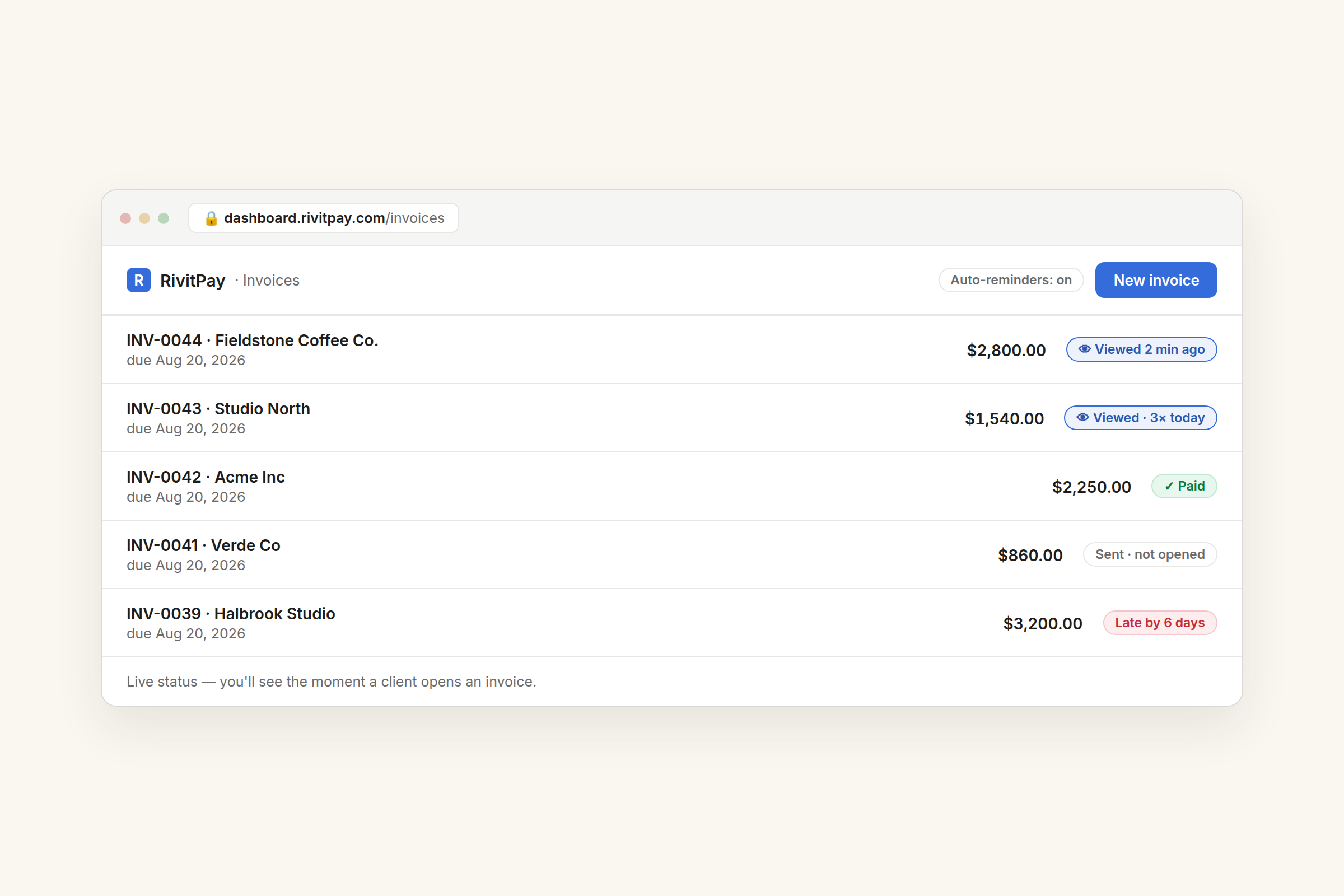
That "Viewed 2 minutes ago" badge changes the game more than it sounds like it should:
- Opened but unpaid for days? Now your nudge is informed, not awkward. "Following up on the invoice from last week" lands differently when you know they've seen it.
- Never opened at all? Don't chase — resend, or check the email address. You just skipped a week of pointless waiting.
- Opened three times this morning? Payment is probably coming. Breathe.
For what it's worth, even the big players skip this: Stripe's own invoicing shows five statuses — draft, open, paid, uncollectible, void — and none of them tell you whether a human ever looked at the thing. We made "seen" a first-class status because for a solo freelancer, that's the difference between guessing and knowing.
The takeaway
You can't control when a client pays. But the data says the people who follow up consistently get paid dramatically faster — and following up well requires knowing what's happening after you hit send.
Free until you've collected your first $5,000 — no monthly fee, ever. You'll see the moment it's opened.
Make an invoice — free, no signup