Getting paid
Your client paid. So why is the money on hold?
It's been a quiet couple of months. Then a $6,000 project wraps up, the client pays the invoice the same afternoon, and the payment shows up as "pending". Or a slice of it is "reserved". Nobody did anything wrong. You just look, to a payment processor's risk system, like an account whose volume suddenly jumped.
Holds and reserves aren't a scam or a glitch. They're written into the terms you accepted. Here's what PayPal and Stripe say they do, why freelance income sets these systems off, and what makes a hold less likely.
Freelance income is lumpy, and risk systems notice
The Federal Reserve's survey of household finances for 2025 found that among self-employed adults, 58% said their income varied from month to month. Among people who worked for someone else, it was 28%.
Now look at what the processors watch for. PayPal's user agreement lists, as an example of seller performance that makes an account high risk, the case where "your typical sales volume increases rapidly." Stripe's reserves FAQ includes an account that "shows an unexplainable sharp increase in processing volume". A freelancer whose income arrives in a few large payments a year matches both descriptions.
What PayPal says it can do
From PayPal's US user agreement, last updated September 14, 2026:
- Holds on payments. "Some common situations where PayPal will hold payments include: New sellers or sellers who have limited selling activity." While a payment is held, "the money is not available to either the sender or the recipient."
- Usually 21 days. "Risk-based holds generally remain in place for up to 21 days from the date the payment was received into your PayPal account." PayPal may release a hold sooner, for example once you've uploaded shipment tracking, but that's at its discretion.
- Up to 180 days if challenged. If the payment is disputed, PayPal will "hold the payment in your PayPal account until the matter is resolved (but no longer than 180 days)."
- Reserves on business accounts. A rolling reserve holds a percentage of each day's payments and releases it later. PayPal's own example: "your reserve could be set at 10% and held for a 90-day rolling period". On that example, $600 of a $6,000 payment would be held for 90 days. A minimum reserve is a set amount you have to keep in your balance.
PayPal says it weighs factors that include "how long you have been in business", "your delivery time frames" and your "payment processing history with PayPal and other providers."
What Stripe says it can do
Stripe calls these reserves. Its FAQ describes a reserve as "a temporary hold on a portion of a business's funds for a predetermined period of time," used to cover refunds and disputes. Stripe uses two types, fixed and rolling. Reasons it lists for applying one include:
- "The business belongs to an industry with longer-than-average delivery windows"
- "The business has an increased risk of not fulfilling customer orders"
- "The account has elevated dispute activity"
- "The account shows an unexplainable sharp increase in processing volume"
The useful parts: Stripe says it will email you with the terms, "including the amount or percentage of funds that will be held, and time period". The reserve shows on the Balance page of your Stripe Dashboard. "A few days before a reserve is set to expire," it reviews the account again and may remove, reduce, increase or extend the reserve. It may be possible to appeal from the Balance page. And "reserves do not impact a business's ability to continue accepting payments with Stripe."
"Delivery window" matters more for freelancers than it sounds. A client paying the full amount up front for three months of work is, in risk terms, a payment for something not yet delivered. That's exactly what reserves exist to cover.
What makes a hold less likely
- Bill in pieces that match the work. A deposit, a milestone and a final invoice are three payments that each follow delivered work. One $6,000 payment after a quiet quarter is the spike these systems look for. Splitting the bill also means a hold catches less money.
- Get set up before the big invoice. Finish account verification while things are quiet, and take a smaller first payment through the account before a large one. New accounts also wait longer for their first payout, which is a separate delay from a hold; we've covered how settlement timing works.
- Keep the paper trail. Stripe's own advice is to "keep detailed copies of receipts, agreements, and proof of shipment", and for services to "maintain access logs or documentation that ties usage back to customers." For a freelancer, that's the signed quote, the invoice, the delivery email and the client's sign-off.
- Describe the work on the invoice. Clients dispute charges they don't recognise. A clear line description and your business name cut down the disputes that lead to holds and reserves. See how card disputes work.
- Give large invoices a bank-transfer option. A transfer straight into your bank account doesn't sit in a processor's balance, so a processor can't reserve it.
- If you're held anyway, answer quickly and in full. Read the email, send the documents asked for, and ask when the money will be released. Stripe says that the more detail you provide, the faster it can decide.
Where RivitPay fits
RivitPay doesn't add a hold of its own. Card and bank payments through the Pay button are Stripe direct charges into your own Stripe account, settling to your bank on Stripe's schedule. RivitPay never holds, routes or touches the money. Your money never sits in a RivitPay balance, so there's nothing for us to hold back or reserve. If Stripe ever applies a reserve, it shows in your own Stripe Dashboard, with Stripe's terms, between you and Stripe.
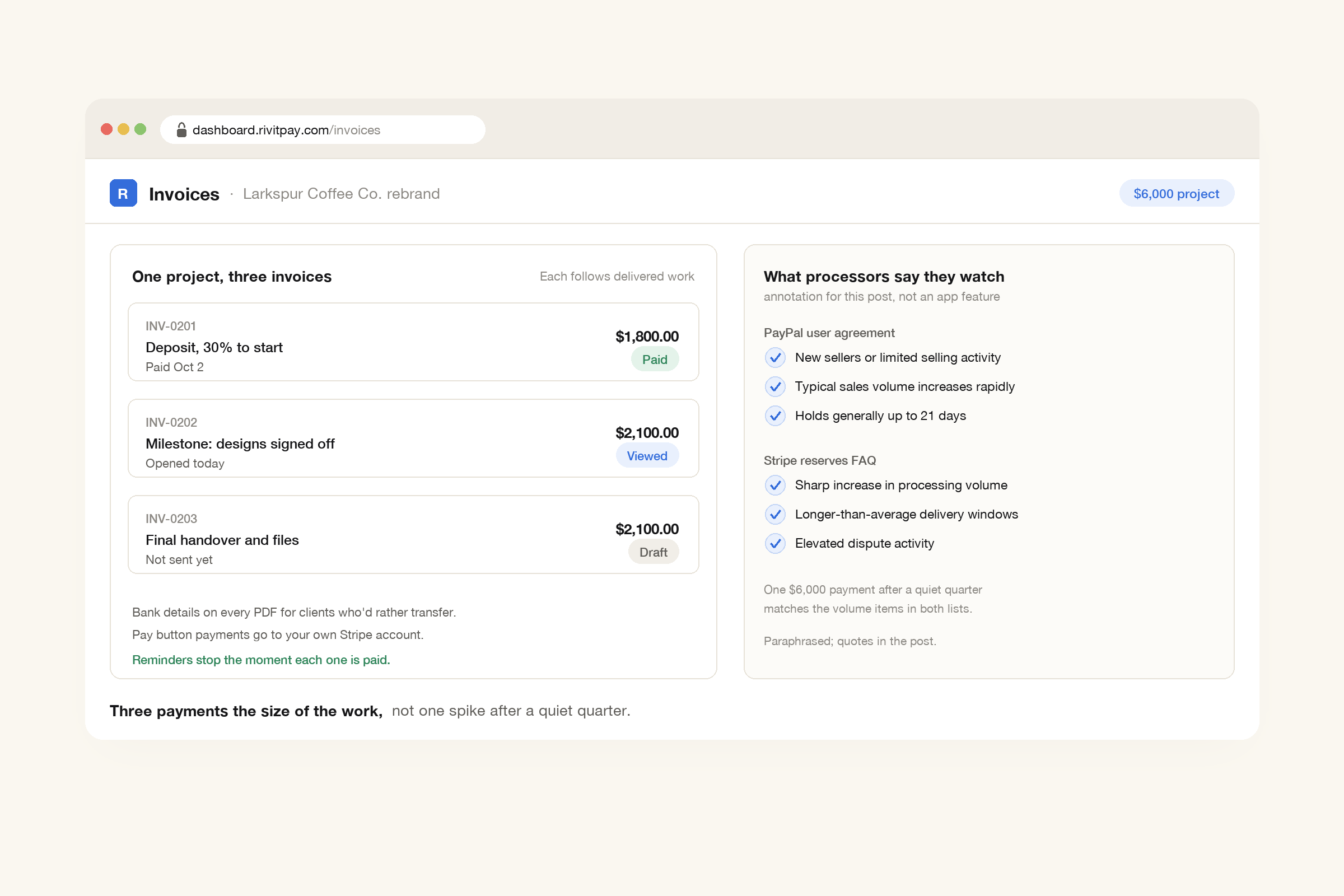
The free invoice generator makes the split easy: a deposit invoice, then milestone invoices, each itemized and in any of 45 currencies, with no signup. Add your bank details so clients can pay a large invoice by transfer. Invoices paid by bank transfer outside RivitPay cost nothing at all and don't count toward the free $5,000. With a free account you can see when each invoice is opened, and automatic reminders in your own words follow up and stop the moment it's paid.
Bill so each payment matches the work
A payment hold is a processor protecting itself against a payment it can't yet explain. A freelancer's big, irregular payments are hard for it to explain. Make each payment match work you've already delivered, keep the paperwork that proves it, and give large invoices a bank-transfer option.
Deposit and milestone invoices, bank details on every PDF, and a Pay button into your own Stripe account. Free until you've collected $5,000.
Make an invoice, free