Choosing how to get paid
Your client's payment system wants a cut
You send the invoice. A week later an email arrives from a company you've never heard of: your client now pays suppliers through its network, and you need to enroll to receive the money. There's a form and a choice of plans. Two weeks after that, the $4,000 you invoiced lands as something a little less than $4,000.
Nobody lied to you, exactly. But some of the systems big clients use to pay their suppliers make money from the supplier, not just the client. Here's how the three common versions work, what they cost on a $4,000 invoice, and how to pick the option that costs nothing.
Who pays whom
Accounts payable networks exist to take paper checks and manual bank transfers off a client's plate. That's genuinely useful. The question is who funds it. Paymode, one of the larger networks, is unusually direct about this in its own FAQ. Vendors accepting its Premium ACH payments "pay a per transaction fee outlined during Paymode enrollment and in the Paymode Terms of Service." Vendors taking virtual cards "pay the interchange fees charged by their card providers."
And on the other side of the same FAQ: "Payers also earn cash back rebates on Premium ACH payments," and eligible Premium ACH and virtual card payments "offer cash back rebates for payers." In plain terms, on some payment types, the fee you pay to receive the money helps fund a rebate to the client who sent it. That doesn't make it a scam. It does mean the plan that suits your client isn't necessarily the one that suits you.
Version one: the premium bank transfer
The first version is a paid tier of an ordinary bank transfer. It comes with extras like detailed remittance data, payment tracking and reporting, and a fee on every payment you receive. A free basic tier usually sits right next to it.
The City of Yakima, Washington, put both side by side in a notice to its vendors when it moved its payments to Paymode. Basic ACH, a direct deposit with remittance details you view one payment at a time: zero. Premium ACH: "1.25% average of Payment Amount". The city's own verdict in the cons column for Premium was blunt: "Not good for small mom/pop shops."
On a $4,000 invoice, 1.25% is $50, every time that client pays you. A one-person studio with a handful of clients rarely needs the reconciliation tools that a supplier receiving hundreds of payments a month pays for. Take that figure as one city's description, not a price list; Paymode's FAQ says the actual fee is set out during enrollment and in its terms of service, so read that screen before you click through.
Version two: the virtual card
The second version is a virtual card: a single-use card number, emailed to you, loaded with exactly the amount of your invoice. You run it through your own card processor like any other card payment.
The network often charges you nothing for this. BILL's developer documentation says it "does not charge any fees for sending virtual cards to vendors," then adds the important part: "the vendor's merchant card processing system may charge card processing fees." That's the cost of accepting any card, and business cards are among the pricier ones. In Visa's US interchange schedule (rates effective April 18, 2026), a purchasing or corporate card used card-not-present carries 2.70% + $0.10 in interchange. That's the part that goes to the card issuer, before your processor adds anything.
On a $4,000 invoice, interchange alone is $108.10. If you're on a flat-rate processor, you'll see a single fee instead, but it's covering that same interchange.
The detail worth knowing: you don't have to take the card. BILL's virtual cards "expire after 20 days," and an unprocessed card is voided and the payment reissued "as check or ACH," based on your earlier preferred method. Letting it lapse is slower, but it's free. Better still, tell the client up front that you'd prefer a bank transfer, so it never comes to that.
Version three: the faster-payout button
The third version shows up after the client has already paid: an offer to get the money now instead of in a few days, for a fee. BILL's documentation describes it plainly: the "Vendor accepts the BILL Instant Transfer option to receive a payment. The vendor pays an additional fee." On BILL's pricing page, Instant Transfer sits in the receiver's fee table at 1.25%, $1 min fee. On $4,000, that's another $50.
Sometimes that's worth it. If rent is due tomorrow, $50 beats a late fee. But it's the same trade as any other early payment: you're paying to close a gap of a couple of days. Here's how to put a yearly rate on that kind of trade. And watch international transfers too: BILL's payer fee table lists $19.99 for an international USD wire and notes that "this fee may be transferred to the receiver."
Before the first payment, ask four questions
The time to sort this out is during onboarding, when you're filling in their supplier forms anyway. Ask accounts payable:
- "How do you pay suppliers?" Find out whether there's a payment network involved before the enrollment email turns up.
- "Is there a free option for receiving ACH?" If there's a basic tier, ask for it by name, and check which plan the enrollment form has you on before you submit it.
- "Can you pay by bank transfer instead of virtual card?" Many systems let you set a preferred method. Set it once.
- "Who pays the wire fee?" For international work, agree this in writing.
Then make your preference visible on every invoice. Put your bank details on it, and say in the terms which method you'd like. AP clerks follow the paperwork in front of them more often than you'd think.
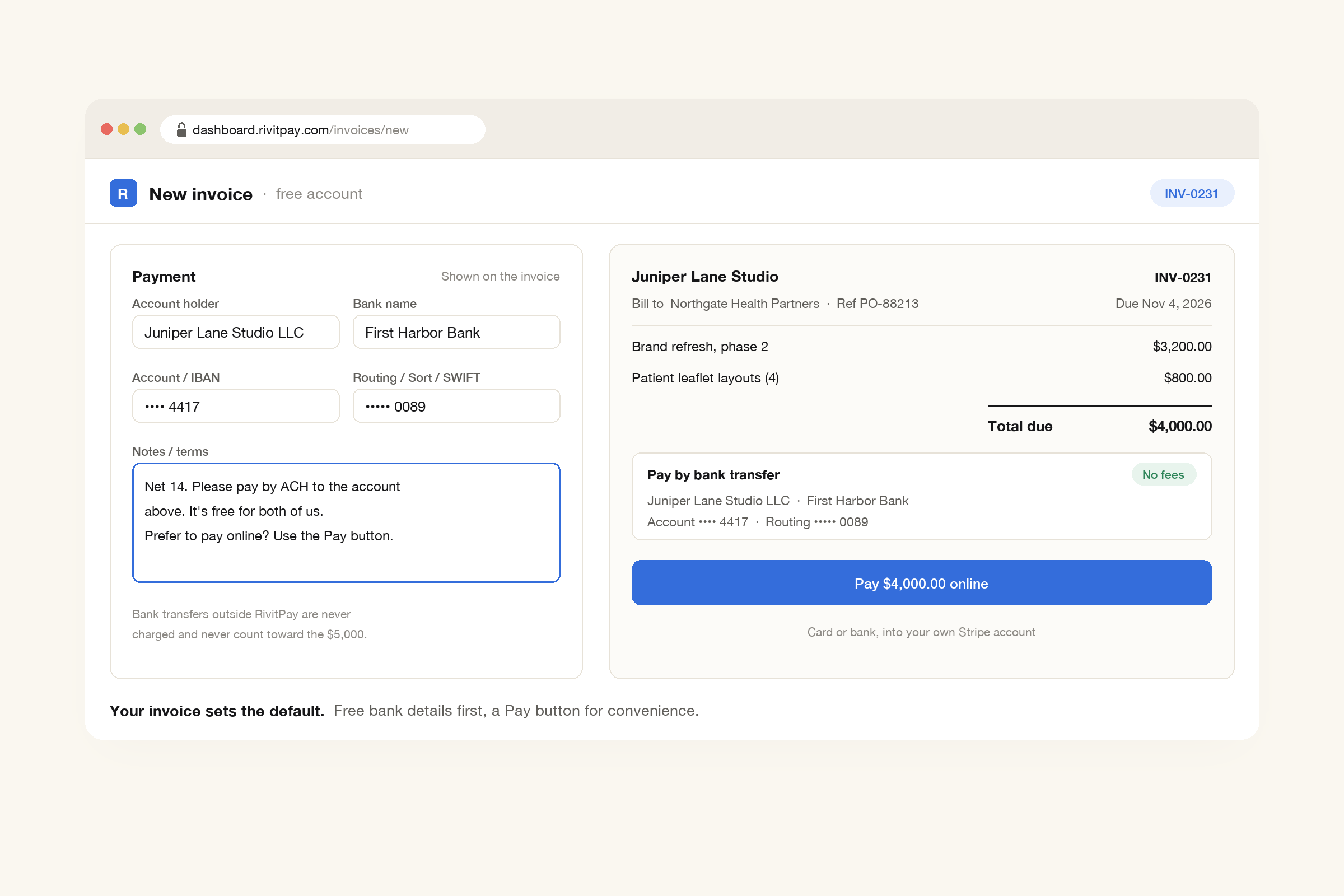
That's how RivitPay invoices are laid out. The free invoice generator prints your account holder, bank, account number and routing or SWIFT code on the invoice, with a notes field for your terms. A bank transfer straight to that account costs you nothing, and it never touches RivitPay. In a free account, each invoice goes out by email with the PDF attached and a Pay button, so a client who'd rather pay online can pay by card or bank, into your own Stripe account. You can see when it was opened, and automatic reminders in your own words stop the moment it's paid.
Read the enrollment form like a bill
A client moving to a payment network isn't bad news. Electronic payments are faster and safer than checks in the mail. Just don't sign up for a plan without reading what it costs you. Ask for the free tier, say no to the card if a bank transfer is available, and put your bank details where AP can't miss them. On a $4,000 invoice, a premium tier plus an instant payout is $100 gone, and a business card costs at least $108. A plain bank transfer costs nothing.
Your bank details on every invoice, a Pay button for clients who want it, and reminders that stop when you're paid. Free until you've collected $5,000.
Make an invoice, free