Choosing how to get paid
Can your client just Venmo you?
You send the invoice. Twenty minutes later the client replies: "Easier if I just Venmo you? What's your handle?" It's quick, it's free for them, and you'd like the money today. Saying yes feels like the obvious answer.
Often it's fine. But the payment apps have rules about business payments that most freelancers have never read, the fees differ more than you'd guess, and the money tends to arrive with nothing to say which invoice it paid. Here's what each one actually says, in its own terms, as of this month.
This isn't a fringe way to get paid
Zelle's own figures, from its February 2026 announcement, give a sense of the scale. Consumers and small businesses sent more than $1.2 trillion through Zelle in 2025, across 4.2 billion transactions, and "nearly 30% of all dollars" flowed to or from small businesses. That's $357 billion in small-business payments, up 26%, with 7.7 million small businesses enrolled.
Those are company-reported numbers, and "small business" covers far more than freelancers. But they're a good reminder that a client offering to pay by app isn't being unprofessional. Plenty of businesses pay this way. The question is whether your side of it is set up properly.
Venmo: personal accounts aren't for business
The Venmo user agreement (effective August 24, 2026) is clear that "personal accounts and Teen Accounts may not be used to conduct business, commercial or merchant transactions with other personal accounts," except for a few cases Venmo allows. For selling, it says: "You can receive payments for the sale of goods and services only by using a business profile or by asking the sender to identify a payment as for goods and services."
Each route costs something. From Venmo's fees page:
- Personal account, client marks it "goods and services": a seller fee of 2.99%.
- Business profile: 1.9% + $0.10 per payment received (2.29% + $0.09 for Tap to Pay).
- A plain friends-and-family payment for your work: no fee, but it breaks the agreement. Venmo says it can reverse a payment if "it is determined that this agreement was violated", which would leave you with the work done and the money gone.
Marking a payment as goods and services also brings in Venmo's Purchase Protection for your client. The agreement says sellers "must keep appropriate transaction documentation", and if Venmo decides a claim qualifies, it can refund the buyer "by reversing the payment". In practice, the invoice you sent is the documentation.
Cash App: personal by default, with a new exception
The Cash App terms (last updated September 11, 2026) describe the peer-to-peer service as being for "peer-to-peer personal, non-commercial purposes". Business payments normally go to a Cash App Business account, where Cash App's help page lists a fee of 2.6% + $0.15 on each payment from a customer's Cash App account (3% for Tap to Pay).
This changed in September. In a September 10, 2026 announcement, Cash App introduced "Earn in P2P", a pilot that lets eligible sole proprietors take payments for their work in their personal account, with "no fees for eligible goods and services payments". The terms come with conditions. You have to be "an individual operating in your personal capacity as a sole proprietor", so single-member LLCs and other entities aren't eligible. You need to have given your full Social Security number. And you have to tag each payment you receive as "Earnings" or "Personal" honestly. It's open to select customers for now, so don't assume you have it.
Zelle: for people you know and trust
Zelle works from inside your bank's app, so the money lands straight in your bank account. Zelle's own FAQ frames it as a way to pay "people you know and trust", and says that "Zelle® does not offer purchase protection." Whether your bank lets you receive business payments with it, and on what terms, is up to your bank.
For a long-standing client who already trusts you, that's often fine. For a new client, the lack of protection is exactly why their finance team might prefer a card, so don't be surprised if they say no.
The fee math on a $1,000 invoice
- Venmo, personal account tagged goods and services: $29.90 fee, you keep $970.10.
- Venmo business profile: $19.10 fee, you keep $980.90.
- Cash App Business account: $26.15 fee, you keep $973.85.
- Cash App Earn in P2P (pilot, if eligible): no fee.
- Card through RivitPay's Pay button: Stripe's roughly 2.9% + 30¢, so you keep about $970.70 within your first $5,000 collected. After that RivitPay adds 1.5%, and you keep about $955.70.
- Bank transfer to the details on your invoice: no RivitPay fee, ever.
To be straight about it: if a client is happy to pay into a Venmo business profile, that's cheaper per payment than a card through us. The cheapest option of all is usually a plain bank transfer. Fees aren't the main problem with payment apps. The record is.
The real problem: money with no invoice attached
An app payment arrives as an amount, a name and maybe a memo, often an emoji. If you have three invoices out with one client, which one did $1,450 pay? Did they send it from their personal account or the company's? Was it marked as goods and services? A month later, nobody remembers. At tax time, the app's year-end form and your own records can tell different stories.
So if you say yes to an app, keep the invoice as the record and tie each payment back to it:
- Set up the right kind of account before you need it. A business profile or business account, so you're inside the app's terms and the payment is clearly business income.
- Ask the client to put the invoice number in the memo. It costs them nothing and saves you a guessing game later.
- Send a receipt when it lands. Amount, date, method, the app's confirmation number and the invoice it settled. That's your paper trail if anyone ever asks, and it covers Venmo's "appropriate transaction documentation" too.
- Don't let an app become the default for new clients. Clients you don't know yet are the ones most likely to dispute a payment or never pay. Invoice them properly, with proper payment options.
Where RivitPay fits
Every RivitPay invoice says how to pay you: bank details under Payment, and anything else, like "Zelle accepted at you@studio.com, please quote the invoice number", in Notes / terms, where it prints on the PDF and travels with the share link. With a free account, the invoice also gets a Pay button. Clients pay by card or bank through it, straight into your own Stripe account, and the invoice records when it was paid.
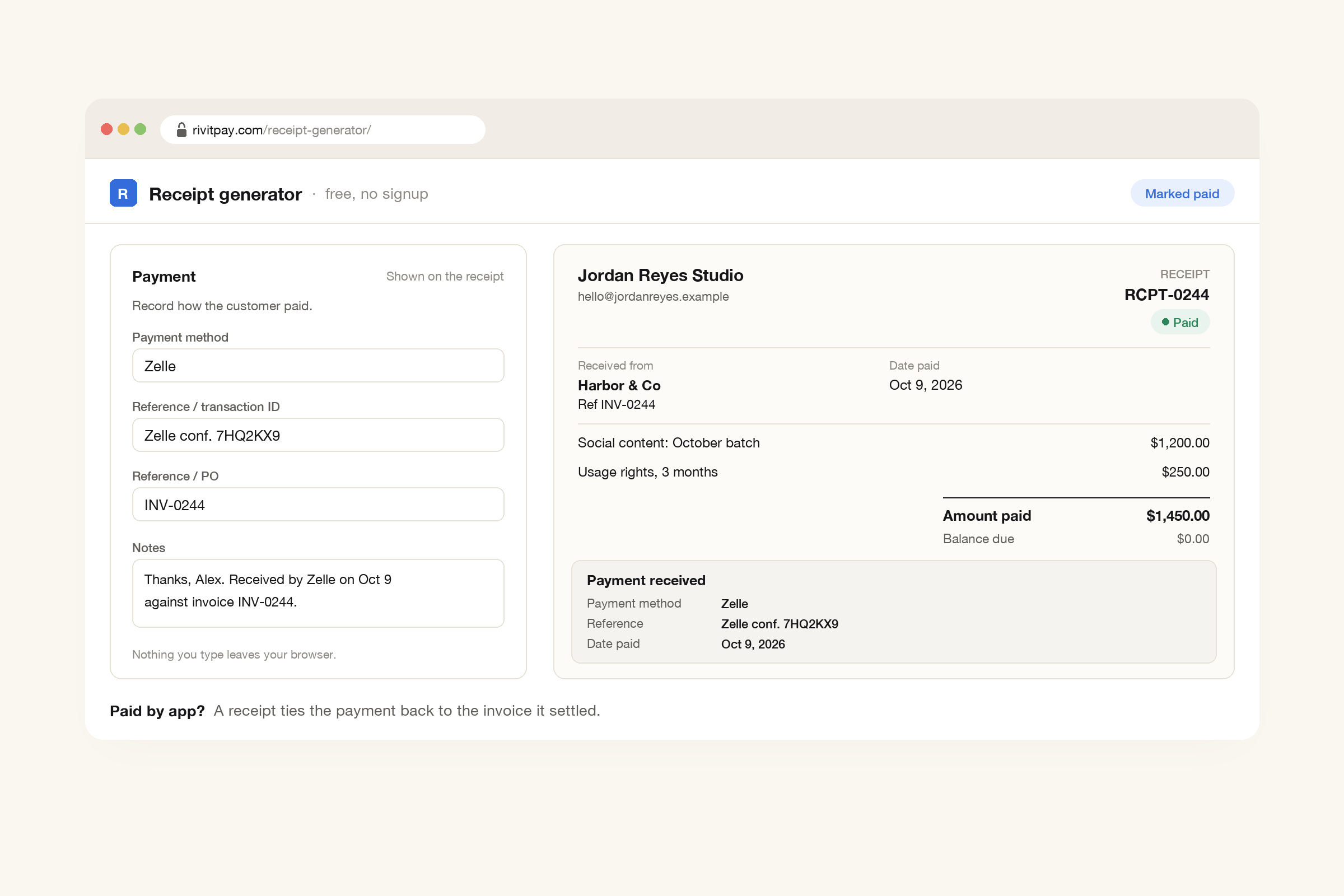
When a client pays by app instead, the free receipt generator closes the loop. Type the method (Zelle, Venmo, anything), the app's confirmation number and the invoice number. The receipt comes out marked paid in full, as a PDF or a share link, and nothing you type is uploaded. Invoicing is free, and there's no RivitPay fee until you've collected $5,000 through the Pay button. Payments outside it, by app or bank transfer, never count toward that and never cost anything.
Yes is fine. Yes without a record isn't.
When a client offers to Venmo you, they're usually trying to be helpful. Take the money, inside the app's rules, and keep the invoice as the record of what it was for. You'll be glad of that record if the client disputes the payment, at tax time, and when you're trying to work out which invoice is still open.
Invoices with your bank details, your payment notes and a Pay button that settles to your own Stripe account, plus free receipts for everything else. Free until you've collected $5,000.
Make an invoice, free