Tax
Your 7 November tax update counts what clients paid, not what you invoiced
Say you're a sole trader in the UK and you're already on Making Tax Digital. Your second quarterly update is due on Saturday, 7 November, and your software wants your income from 6 April to 5 October. You go down your invoice list and get stuck on one: £3,000, sent on 22 September. The client paid it on 9 October. Does it go in?
For most freelancers the answer is no. Once you see why, the rest of the quarterly update is easy. It comes down to one rule that changed in 2024, and a handful of dates that are easy to get wrong.
The cash basis: income counts when the money arrives
Since 6 April 2024, the cash basis has been the default for sole traders and for partnerships without corporate partners. GOV.UK's cash basis guide puts it in one line: "With cash basis you only record income or expenses when you receive money or pay a bill." It also spells out what that means for invoices: "Only record income you actually receive. Do not count any money you're owed but have not yet received."
The guide's own example is the one that matters to freelancers. You invoiced someone on 15 March 2024 and the money didn't arrive until 30 April 2024: "Record this income as received on 30 April 2024." That's a different tax year.
You can opt out. Under traditional accounting, "you record income and expenses by the date you invoiced or were billed", and you'll have to say so on your return. Limited companies and LLPs can't use the cash basis at all, so this post is for sole traders. If you also invoice US clients, the rule will sound familiar: the US cash method works the same way, which is why you can't write off an unpaid invoice there either.
What the 7 November update covers
Quarterly updates are running totals. HMRC's quarterly updates guidance says "each quarterly update covers from the start of the current tax year (6 April) to the end of the update period." On the standard periods, that gives you:
- 6 April to 5 July: due 7 August
- 6 April to 5 October: due 7 November
- 6 April to 5 January: due 7 February
- 6 April to 5 April: due 7 May the following tax year
If your accounting year runs 1 April to 31 March, you'd use calendar periods instead, ending on the last day of June, September, December and March. The deadlines are the same.
An update isn't a tax return. HMRC calls them "summaries, not tax returns", and "HMRC will not receive details of individual receipts or invoices in your quarterly updates." Your software adds up your digital records. According to the digital records guidance, each record needs the amount, the "date when the income was received or expenses incurred", and a category. If your self-employment turnover is under £90,000, the categories are simple: "If you're a sole trader, you only need to record whether a transaction is income or an expense."
Three invoices, three answers
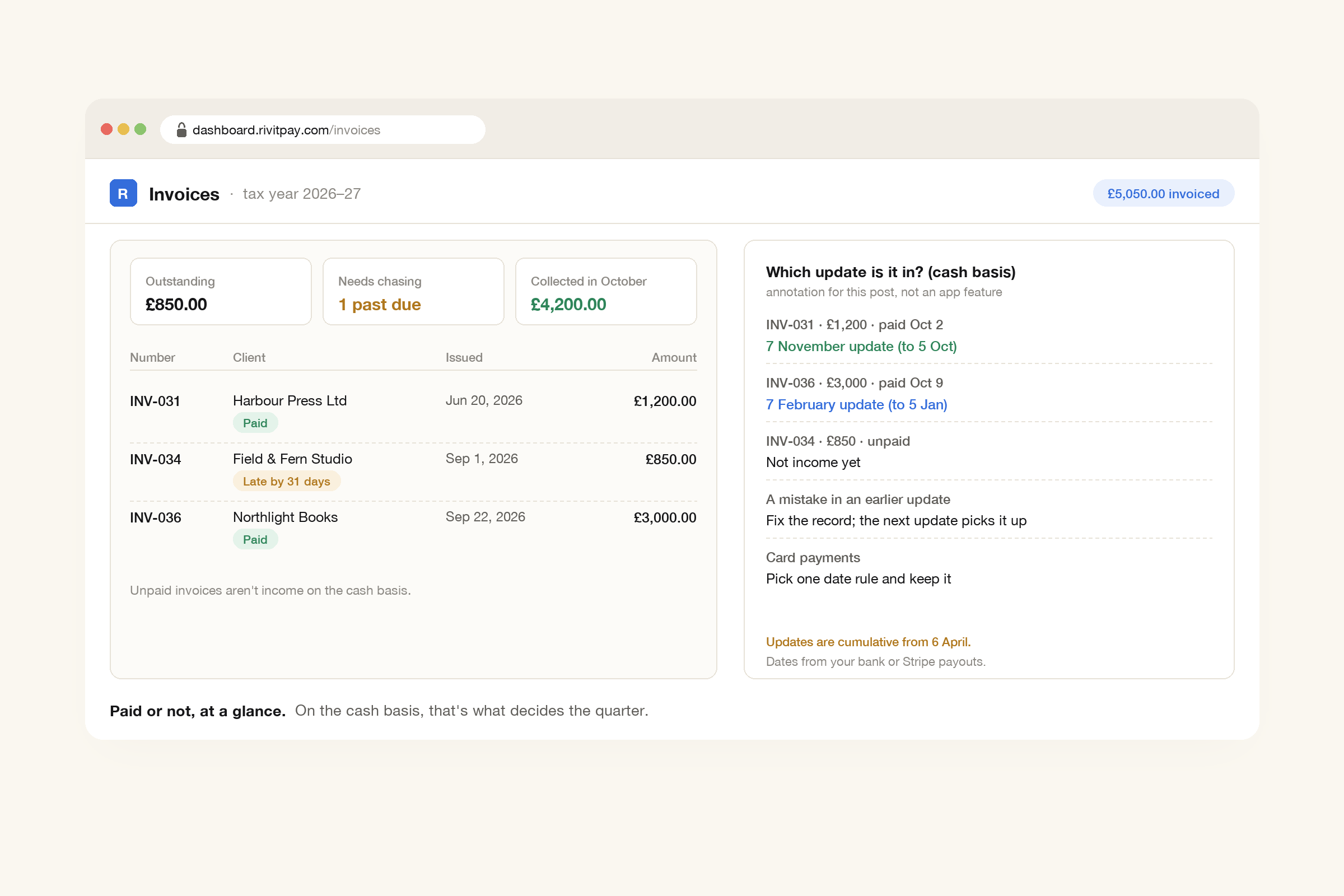
Take a freelance illustrator on the cash basis and the standard update periods. She has three invoices from this tax year that aren't straightforward:
- £1,200, sent 20 June, paid 2 October. It goes in the 7 November update. She invoiced it in the first quarter, but the money arrived before 5 October.
- £3,000, sent 22 September, paid 9 October. It doesn't go in on 7 November. It goes in the third update (6 April to 5 January), which is due on 7 February.
- £850, sent 1 September, still unpaid. It isn't income in any update yet. If it's paid in December, it counts then.
On traditional accounting, all three would be in the 7 November update by invoice date, £5,050 in total. On the cash basis, £1,200 of that goes in.
The dates that trip people up
Card payments. A client pays by card on 4 October and the payout reaches your bank on 7 October. Which date counts? GOV.UK leaves it to you: "You can choose how you record when money is received or paid (for example, the date the money enters your account or the date a cheque is written), but you must use the same method each tax return." If you go by the date money reaches your bank, that payment misses the 5 October cut-off and goes in the next update. Choose one method and stick to it.
Payouts with fees taken off. Card processors usually pay you the amount minus their fee, and one payout can cover several payments. Don't record the payout as one lump of income. Record what each client paid against its invoice, and record the processing fee separately as a cost. Then both totals are right.
Mistakes. Because every update covers the whole year so far, you can fix a mistake later. If you correct a record during the tax year, the guidance says "it will be fixed when you send your next quarterly update." You also "do not need to make any accounting or tax adjustments before sending a quarterly update." That work waits for the year-end return.
A quiet quarter. If nothing came in, "you must still send your quarterly update to tell HMRC."
No penalty points this year, but don't skip it
For the 2026 to 2027 tax year, "HMRC will not apply penalty points for late quarterly updates." It's a grace period, not an exemption: "You will need to send your quarterly updates before you are able to submit your tax return using software." From 6 April 2027, each missed deadline earns a point, and four points means a £200 penalty. Late tax returns still get points this year too.
A lot of people are doing this for the first time. HMRC said in February that 864,000 sole traders and landlords faced the new rules from April. By 12 August, more than 436,000 had sent their first update and over 570,000 had signed up. Since September, HMRC has been signing people up itself if they should be on it and haven't joined. In April 2027 the threshold drops, and HMRC's 5 October estimate is that "around 1,077,000 more sole traders and landlords" will have to join. Our record-keeping post has the thresholds year by year.
If you get stuck on the day itself, HMRC's October agent update says the Self Assessment general enquiries helpline will be open on Saturday 7 November "from 9am to 3pm" for help with quarterly updates.
Where RivitPay fits
On the cash basis, every invoice comes down to two questions: has it been paid, and when did the money arrive? The RivitPay dashboard shows what's outstanding in each currency, which invoices need chasing, and which are late, with a "Late by 31 days" style label. When a client pays through the invoice's Pay button, by card or bank, the money goes straight into your own Stripe account and the payment is tied to that invoice. Your Stripe dashboard shows when each payout reached your bank.
For bank transfers, ask clients to put the invoice number in the payment reference, so each bank statement line matches an invoice. If a client wants a receipt, the free receipt generator has a Date paid field. And because tax on the cash basis follows the money, chasing matters twice over. A free account lets you email invoices, see when the client has opened one, and send automatic reminders in your own words that stop once it's paid. The invoice generator is free with no signup, in pounds or any of 45 currencies.
The short version
If you're a sole trader on the cash basis, the 7 November update counts money that reached you between 6 April and 5 October, whenever you sent the invoice. Unpaid invoices don't go in. Choose one way to date card payments and use it every time. If an invoice lands in the wrong quarter, fix it in your records and the next update picks it up. There are no penalty points this year, but send the update anyway.
Paid, viewed or late at a glance, a Pay button for card or bank, and reminders that stop when the money arrives. Free until you've collected $5,000.
Make an invoice, free