Big clients
Your client wants the invoice in their supplier portal. What changes, and what it costs
You land a bigger client. The work goes well, you send the invoice as a PDF, and a week later accounts payable replies: "Please submit your invoice through our supplier portal." The link leads to a registration page for Coupa or SAP Business Network, a purchase order number you've never seen, and a form that doesn't look like your invoice at all.
This is normal with larger companies, and it's mostly fine once you know how it works. But it changes a few things. The PDF you emailed may not count. The PO controls what you can bill. And on one of the big networks, there's a fee schedule that's worth reading before you click "upgrade".
Why big clients do this
These portals are the supplier side of the client's purchasing software. The client raises a purchase order, sends it to you through the network, and expects an invoice back that matches it, so their system can approve and pay it with as little manual work as possible.
The networks are huge. SAP describes SAP Business Network as "the world's largest B2B trading partner platform, supporting more than US$6.5 trillion in annual transactions", and says "millions of companies across 190 countries" use it. If you work with large companies for long enough, you'll end up on one.
Your emailed PDF may not count
The main thing that changes is that the invoice now has to be in their system. Coupa's own supplier guide to invoicing lists emailed invoices as an option for small suppliers, but says that "this method may not be allowed by all companies, so check with your customers prior to sending."
So if a client uses a portal, ask accounts payable early, ideally before you start the work, how they want invoices sent. An invoice sitting in someone's inbox may not be in the approval queue at all. And if you're counting days from when you emailed it, the client may be counting from when it reached their system.
The purchase order sets the limits
Most portal invoices start from the PO. Coupa says suppliers can "Flip your incoming PO's into invoices right from the PO email", or "Create invoices directly from purchase orders on the Coupa Supplier Portal for free." The invoice inherits the PO's lines, prices and reference numbers, and the client's system checks your invoice against them.
That works well when the PO matches the job. It's a problem when the job grew. If you did extra work that isn't on the PO, you usually can't just add a line and hope it gets through. Ask for a PO change, in writing, before you do the extra work. That's the same advice as for scope creep in general, but with a PO, the system enforces it for the client.
Why portal invoices get rejected
SAP's support article on rejected invoices lists four reasons:
- "The invoice does not meet the buyer's transaction rules."
- "Required information is missing or invalid."
- "The buyer's integrated invoicing system rejects the invoice."
- "The invoice does not comply with buyer-specific invoicing requirements."
The reason shows on the invoice's History tab. SAP's advice is to contact the buyer if the reason comes from their own system or process and, once it's fixed, to "create and submit a new invoice." Every rejection resets the process, so it's worth getting the first one right: the exact PO number, the right legal entity, your tax ID, and the remit-to bank details the client has on file.
What SAP Business Network costs suppliers
Coupa says its supplier portal is free for creating invoices from POs. SAP has two kinds of supplier account, and only one of them is free.
According to SAP's training course on supplier fees, "There is no fee for the standard level subscription", and a standard account lets you "transact an unlimited number of documents such as purchase orders and invoices". That's the account most freelancers need.
The enterprise account adds features like reporting and ERP integration, and it's where fees come in. They have two parts:
- A transaction fee of 0.155% of the volume with each buyer, or 0.35% where the relationship uses service entry sheets. It starts once you pass both thresholds with one buyer, "5 docs and $50K USD", in a rolling 12 months. Then "they become chargeable across all buyer relationships." It's capped at $20,000 a year per buyer relationship.
- An annual subscription fee based on how many documents you exchange. SAP's support FAQ lists Premium (up to 4 documents) at no cost, Bronze at $50, Silver at $750, Gold at $2,250 and Platinum at $5,500.
For a freelancer, the amounts are small next to card fees. On a $60,000-a-year client, 0.155% is $93. The bigger point is to know which account you're on. If a client's onboarding steers you toward an enterprise account, the standard one is free and handles POs and invoices. SAP also lists fee exemptions for some US suppliers, including those transacting with public-sector buyers such as government agencies and 501(c)(3) non-profits, and certain certified small businesses.
Following the payment
Once the invoice is approved, the portal can show you where your money is. Coupa's guide to its Payments page says it gives you "a complete overview of your payments from Coupa customers", with a status showing where each payment is "within its overall lifecycle". It also explains the Payment Released Date, which "is the date that your buyer released the payment. It is not to be confused with the date your buyer created or approved the payment."
The payment method can be a bank transfer, a check or a virtual card. If it's a virtual card, you'll pay card processing on it, which we covered in your client's payment system wants a cut. If you can choose, a bank transfer to your own account is usually the one that costs you nothing.
Where Rivit Invoices fits
A portal doesn't replace your own invoicing. You still need one numbering sequence across all your clients and a copy of every invoice for your records, including the ones that went through a portal.
The free estimate generator makes the quote the client turns into a PO, so the lines on the PO start out matching your work. In the invoice generator, put the PO number in the Reference / PO field exactly as the client issued it, and use the same invoice number in the portal. Your PDF is then your own record of what you billed and when. If the client accepts attachments, you can upload it with the portal invoice.
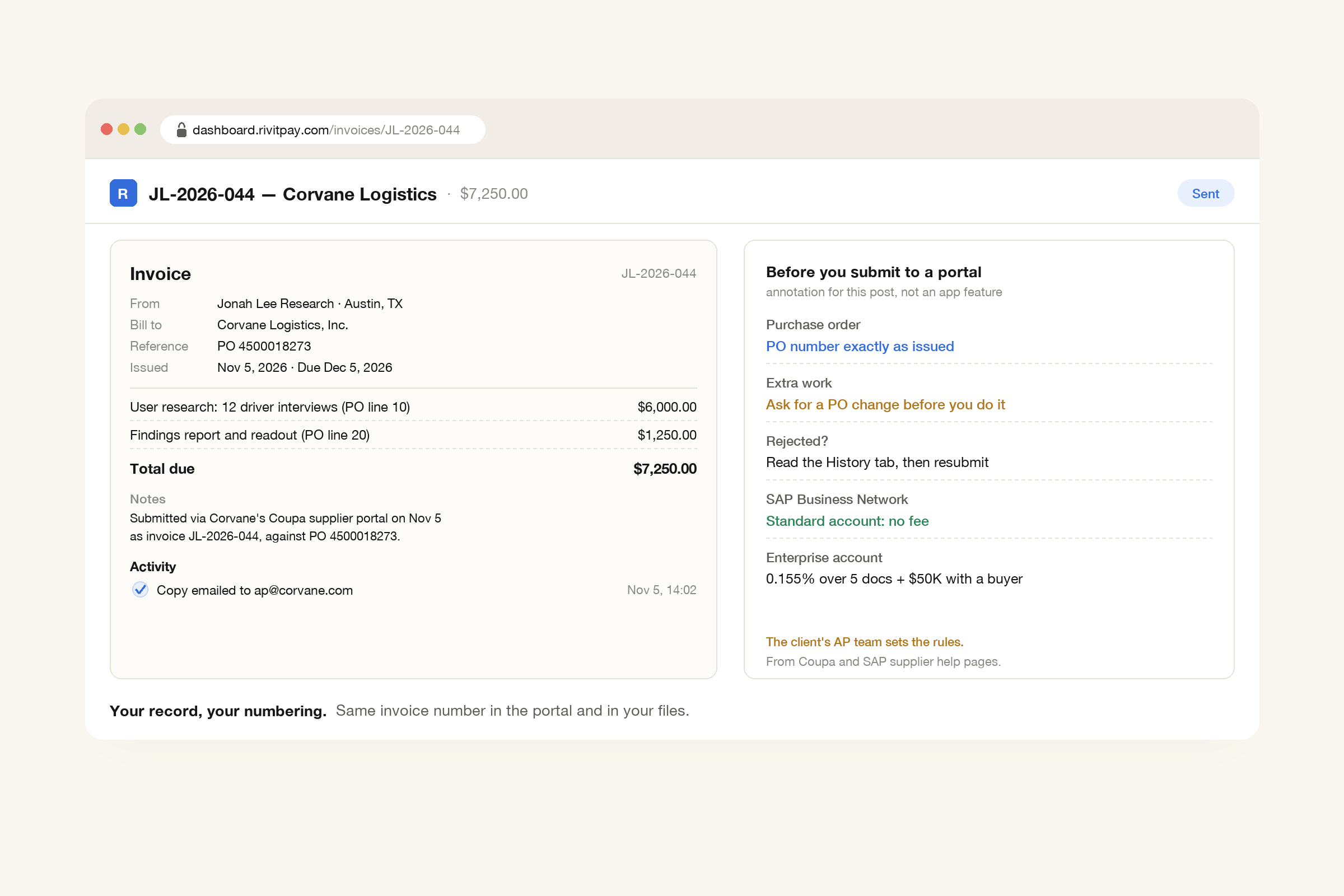
Add a line in Notes / terms recording how you submitted it, such as "Submitted via the client's supplier portal on November 5 as invoice JL-2026-044." Months later, when someone asks what happened to that invoice, you'll have the answer.
Get the PO first
A supplier portal mostly rewards doing things in the right order: agree the work, get the PO, do the work, then invoice against the PO with the same number on your own copy. Stay on the free account unless you need more, and when an invoice comes back rejected, read the History tab before you resubmit.
An itemized estimate, then an invoice with the PO number, your bank details and your own numbering. Free, no signup.
Make an estimate, free