Getting paid
Your December invoice has a deadline, and it isn't the due date
You finish a project on December 14, send the invoice the same afternoon, and give the client 30 days. Mid-January comes and goes, and the money arrives in late January. Nobody did anything wrong. Your invoice just missed the last payment run of the year by a few days, and the next one wasn't until January.
Big clients don't pay invoices one at a time. They pay in batches on set days, and around Christmas a lot of them stop for two or three weeks. Their published schedules show it. Here's what those schedules say for this year, what the banks are doing over the holidays, and how to get your invoice into the last run of 2026.
What a year-end payment schedule looks like
Plenty of public bodies publish their accounts payable calendars, so you can see the pattern for yourself. Three for 2026:
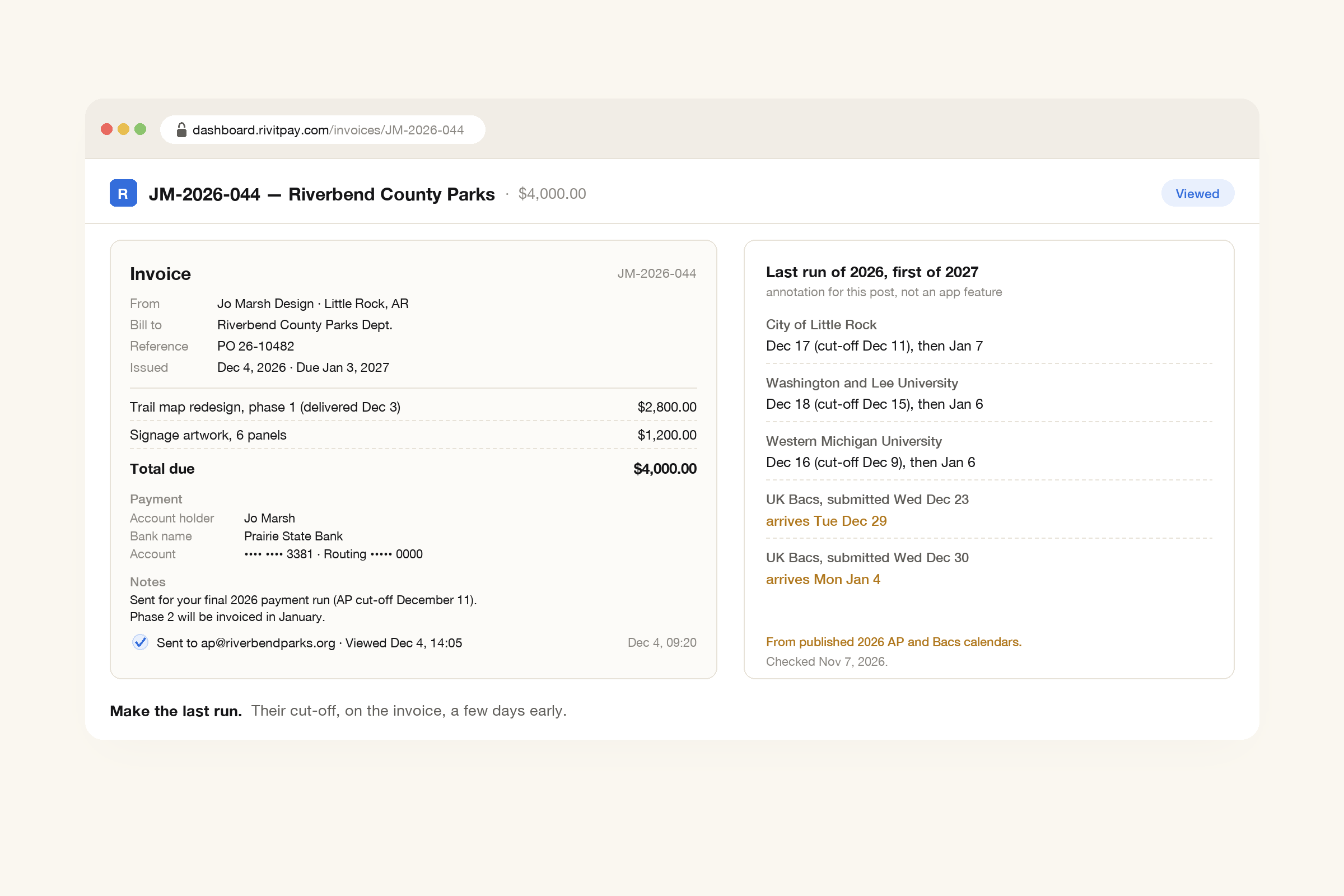
- City of Little Rock, Arkansas. Its 2026 payment calendar has a check run on December 17, 2026 for invoices that reach accounts payable by December 11. The next check run is January 7, 2027. The weeks in between are marked "Christmas Break - No check run this week" and "Fiscal Year End - No check run this week".
- Washington and Lee University, Virginia. Its disbursement schedule lists the "2026 Final Check Run" on December 18, with a cut-off of December 15. The "2027 First Check Run" is January 6.
- Western Michigan University. Its AP schedule pays on December 16 for paperwork in by December 9. The next two periods say "Winter Closure- No check run". Payments restart on January 6, 2027.
Last year's notices said the quiet part out loud. UCLA's winter closure page for 2025 asked departments to "submit 2025 invoices to Accounts Payable no later than Wednesday, November 26", and warned that later ones "will continue to be processed but may not be paid this calendar year." In England, Nuneaton and Bedworth Borough Council asked suppliers to email invoices by 5pm on December 19, 2025: "Invoices received after this time may not be paid until January 2026."
One detail matters more than any of the dates. Those cut-offs are when the invoice has to reach accounts payable, approved and ready to pay. Your invoice goes to the person who hired you first. They have to approve it and pass it on, and they're winding down for the holidays too. So the date that matters to you is a few working days before the published one.
The cut-off can get you paid early
Here's the part most people miss. The last run of the year often pays invoices that aren't due yet, so they don't sit unpaid through the shutdown.
Little Rock's December 17 run covers invoices with due dates from December 20 right through to January 9, 2027. Nuneaton and Bedworth's final 2025 run, on December 23, included "all invoices approved for payment that are due to be paid up to and including 7 January 2026."
So an invoice that makes the cut-off can be paid before Christmas, even with a due date in January. One that misses it by a day waits for the first run of the new year, then for the bank transfer to arrive. The difference can be a month.
Not every client works like this. A small business owner who pays you from their banking app may pay on December 23 without thinking about it. But if your client has an accounts payable team, assume there's a cut-off until they tell you otherwise.
The banks take days off too
In 2026, Christmas Day and New Year's Day both fall on a Friday. That turns each into a long weekend for the systems that move money.
- US bank transfers (ACH). The Federal Reserve's holiday schedule lists December 25, 2026 and January 1, 2027 as holidays. Its FedACH table shows processing for Christmas ending at 11:30 p.m. ET on December 24 and restarting at 5:30 p.m. ET on December 27. A transfer your client sends on Christmas Eve afternoon may not reach you until Monday the 28th.
- US wires. For Fedwire, the Fed observes "all Saturdays, all Sundays and the holidays listed on the Federal Reserve Banks' Holiday Schedules", so wires stop on both Fridays as well.
- US instant payments. The Fed's FedNow service runs "each day of the week, including weekends and Federal Reserve Bank holidays." It only helps if both your client's bank and yours use it.
- UK Bacs payments. Bank holidays in England and Wales are December 25, Monday December 28 (standing in for Boxing Day, a Saturday) and January 1. Bacs's 2026 processing calendar shows that a payment run your client submits on Wednesday, December 23 arrives on Tuesday, December 29. One submitted on Wednesday, December 30 arrives on Monday, January 4. Councils and big companies often pay suppliers by Bacs.
Card payments are different. Your client can pay by card on Christmas Day, and the payment goes through. What waits is the payout from Stripe to your bank. Stripe's payouts documentation says: "Payouts scheduled on weekends or holidays arrive on the next business day." Stripe also offers Instant Payouts, which "you can request … any time, including weekends and holidays", but "New Stripe users aren't immediately eligible". Your Stripe Dashboard shows whether you can use them and what they cost.
How to make the last run of the year
- Ask this week. Email each regular client: "When is your last payment run of 2026, and when does an invoice need to reach you to make it?" Ask now, while people are still at their desks. Write the answers down.
- Work back from their date. If their cut-off is December 11, your invoice needs to be with the person who approves it by about December 7. Set yourself a reminder for that date, not the end of the month.
- Bill what's done. If a project runs past the cut-off, ask whether you can invoice the work finished so far before the cut-off and the rest in January. Most clients would rather do that than owe you a large balance over the holidays. If your contract fixes when you can bill, follow it or agree the change in writing.
- Bill retainers early. If you invoice a retainer in advance, send December's invoice at the start of December, not the end.
- Make the invoice easy to approve. A wrong purchase order number or a missing contact gets an invoice sent back, and in December that can cost you three weeks. Our post on invoice errors that delay payment has the checklist. If the client pays through a supplier portal, submit there too.
- Check it arrived. If the invoice hasn't been opened two working days before the cut-off, email the person who approves it. Don't wait for the due date.
One thing to know for your own taxes: if you use the cash method, as most US freelancers do, money that reaches you in January usually counts as income for the new year. That isn't always bad, but it's worth knowing before you plan your estimated tax payments. Our post on the fourth quarter explains how it works.
Where Rivit Invoices fits
A few things in Rivit Invoices help with the December rush.
- Notes / terms. Put the client's cut-off on the invoice itself, for example: "Sent for your final 2026 payment run (AP cut-off December 11)." It tells the person approving the invoice that there's a date to meet.
- Reference / PO. Copy the purchase order number exactly as the client wrote it, so the invoice isn't sent back.
- Viewed tracking. Send from a free account and you'll see when the invoice is opened. If it hasn't been opened a few days before the cut-off, that's your cue to follow up.
- Reminders. Automatic reminders go out on your schedule, in your words, and stop the moment the invoice is paid through the Pay button. In December, a reminder before the client's cut-off does more good than one after the due date.
- The Pay button. Once you've connected Stripe, invoices you send from your account carry a Pay button, so a client who misses the payment run can still pay by card that day, if they're willing to. The money goes to your own Stripe account and follows Stripe's payout schedule.
The short version
Many big clients stop paying for two or three weeks around Christmas, and their last payment run is mid-December. Little Rock's is December 17, Washington and Lee's December 18, Western Michigan's December 16. Make the cut-off and you may be paid before Christmas, even for an invoice due in January. Miss it and you wait until the first run in January, then for the bank transfer to arrive. Ask each client for their date this week, send the invoice a few days before it, and check it's been opened.
A free invoice with your purchase order number, a note about the client's cut-off and your bank details, ready in a minute. No signup.
Make an invoice, free