Getting paid
On a big invoice, the card fee is a real line item. When to ask for a bank transfer
You finish a big project and send a $10,000 invoice. The client opens it, sees a Pay button, and pays by card. Two minutes, done. Then the payout lands, and it's about $355 short.
That number comes from our own pricing page. A $10,000 card payment through the Rivit Invoices Pay button costs about $290.30 in Stripe processing plus $65 from us. We'd rather you hear that from us than notice it in your bank account. On small invoices a card fee is the price of being paid quickly. On big ones, it's worth asking whether the client could pay by bank instead.
Percentages grow with the invoice
Card fees are a percentage of the payment, so a bigger invoice means a bigger fee. Bank payments are usually priced differently: a small capped fee, or nothing at all. Here's what one payment costs at a few invoice sizes, using each provider's published US rates as of today:
| How the client pays | $1,000 | $2,500 | $10,000 | $25,000 |
|---|---|---|---|---|
| Card, Rivit Invoices Pay button (about 2.9% + 30¢ to Stripe, plus 0.65%) | $35.80 | $89.05 | $355.30 | $887.80 |
| Card, on a PayPal invoice (2.99% + $0.49) | $30.39 | $75.24 | $299.49 | $747.99 |
| PayPal Checkout or Venmo, on a PayPal invoice (3.49% + $0.49) | $35.39 | $87.74 | $349.49 | $872.99 |
| PayPal Pay by Bank (ACH), on a PayPal invoice (1%, capped at $10) | $10.00 | $10.00 | $10.00 | $10.00 |
| Stripe ACH Direct Debit (0.8%, capped at $5) | $5.00 | $5.00 | $5.00 | $5.00 |
| Bank transfer to the details on your invoice | $0 | $0 | $0 | $0 |
The PayPal rates are from its business fees page, last updated November 4, 2026, which lists Pay by Bank on invoices at "1% (capped at $10.00 per transaction)" and a $0.49 fixed fee on US dollar invoices. Stripe's ACH Direct Debit page lists "0.8% with a US$5.00 cap". Our row uses the same "about 2.9% + 30¢" estimate as our pricing page, and Stripe's real rate depends on your country and the card.
Yes, that puts our card row at the top. Of the card options here, ours costs the most on a big invoice. We're showing you because the cheapest row on the table is free with us too, and most people don't use it often enough.
The crossover comes early. Once an invoice passes about $275, a card payment through our Pay button costs more than PayPal's $10 bank cap. Past about $135, it costs more than Stripe's $5 cap. And by $2,500, you're paying close to $90 for a payment that could have cost nothing.
Your client's accounts team already pays this way
Asking a business client for a bank payment isn't an odd request. It's how most of them already pay suppliers. Nacha, which runs the ACH Network, reported on October 20, 2026 that there were 9.3 billion ACH payments worth $25.6 trillion in the third quarter. Business-to-business payments grew 9.7% to nearly 2.3 billion in the quarter, which Nacha put down to organizations continuing "to move away from checks".
Nacha's full-year figures for 2025 show 8.08 billion business-to-business payments worth $63.11 trillion. Divide one by the other and the average B2B ACH payment was about $7,800. That's our arithmetic, not Nacha's, and big corporate transfers pull the average up. Still, it tells you that paying a few thousand dollars by ACH is routine for an accounts payable team.
Why clients reach for a card anyway
To be fair to the client, there are real reasons to pay by card. It's quick, and the Pay button is right there. Some companies want small suppliers paid on a company card. And a card payment doesn't leave the client's bank account until the statement is due, which can give them a few weeks of breathing room, plus points.
None of that is wrong, and you don't have to argue it. You've got a few options:
- Ask, politely, before the invoice goes out. "For anything over $2,000 I'd prefer a bank transfer. My details are on the invoice." Most accounts teams will just do it.
- Price it in. If a client always pays by card, treat the fee as a cost of that client and set your rate with it in mind. Adding a separate card surcharge is more complicated than it looks, with card network rules and state laws to follow.
- Split it. Take the deposit by card so the project starts quickly, then invoice the balance with bank details. Deposits are smaller, so the card fee is too.
Make the bank option easy to use
People take the easy route. If your bank details are hidden in an old email, the Pay button wins. A few things help:
- Put the details on the invoice itself. Account holder, bank name, account number and routing number, so nobody has to ask.
- Say which you prefer. A line in the notes, such as "Bank transfer (ACH) preferred for this invoice", sets the default without making a fuss.
- ACH, not a wire, if you can. Wires usually cost the client money to send, and some banks charge you to receive one. Newburyport Bank's 2026 business fee schedule, for example, lists $15.00 for an incoming domestic wire. Check your own bank's schedule.
- Protect the details. Bank details on an invoice are exactly what invoice fraudsters try to swap. Tell clients your details won't change by email alone, and ask them to call you if they ever get a message saying they have. Here's how that scam works.
Bank payments aren't instant, either. Nacha's guide to ACH says the network settles payments four times a day on business days, and closes on weekends and federal holidays. Card payouts take time too, as we covered in why paid isn't the same as settled. Neither is much faster than the other, so speed is rarely a reason to choose the card on a big invoice.
Where Rivit Invoices fits
Every invoice from the free invoice generator has a Payment section for your bank details: account holder, bank name, account or IBAN, and routing, sort code or SWIFT. They print on the PDF and show on the share link. Add your preference in Notes / terms, and the client has everything they need to pay by bank without asking.
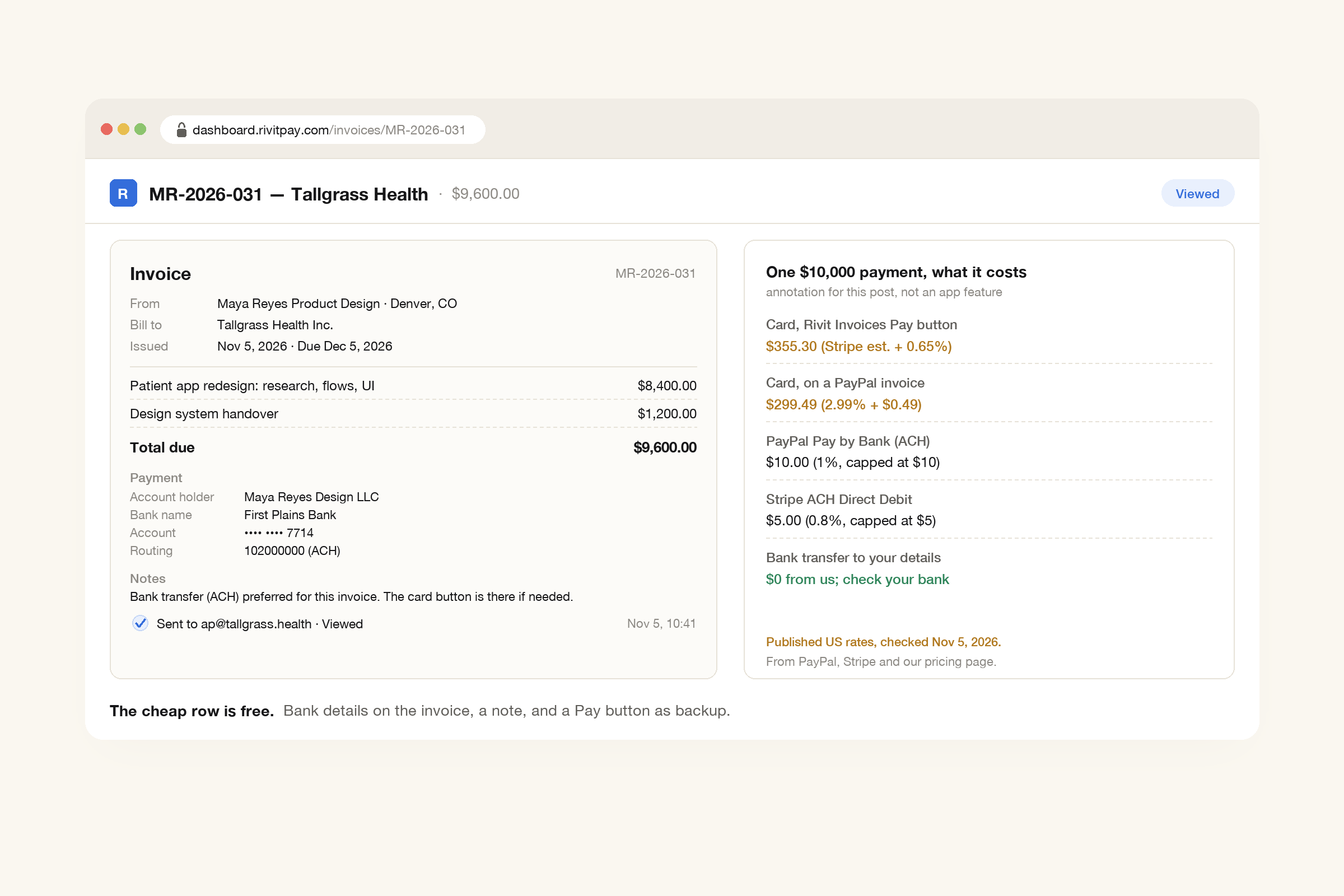
With a free account, the invoice still carries a Pay button for clients who'd rather use a card. That's handy on smaller invoices, or when a client simply won't do a transfer. Card payments go straight into your own Stripe account. You can also see when the client has opened the invoice, and automatic reminders follow up in your own words.
A percentage is fine on small invoices. On big ones, ask.
Paying 3.5% on a $300 invoice is about $11, and it's worth it to get paid fast. Paying it on $10,000 is $355, about the cost of a good day's work. Put your bank details on every invoice, say you'd prefer a transfer for the big ones, and keep the card button for when it's the only way a client will pay.
A free invoice with your bank details, your notes, and a Pay button for anyone who'd rather use a card. No signup.
Make an invoice, free