Drop an image here or click — PNG, SVG or JPEG. Large files are resized automatically.
Bill to
Details
Due date is before the issue date.
Priced in
Line items
DescriptionQtyRate
More options
Payment
Funds go wallet to wallet
NetworkToken
Payments settle directly to this address. Nothing routes through RivitPay.
Everything stays in your browser. The share link carries the invoice itself — there is no database.
Free crypto invoice generator
Create a crypto invoice your client can actually pay: line items and a total in the currency you work in, plus the exact token amount, the network, your wallet address and a payment QR code. It's free, with no signup, and payments go straight from your client's wallet to yours. RivitPay never holds the funds and takes no fee.
What is a crypto invoice?
A crypto invoice is a payment request settled in cryptocurrency rather than by bank transfer. Like any invoice it lists line items, tax and a total priced in an ordinary currency such as dollars, euros or rupees. In place of bank details, it states the exact token amount, the network and the wallet address to pay. RivitPay adds the parts that make it payable: an EIP-681 QR code any mobile wallet can scan, a one-click pay button for browser wallets, and an on-chain check that confirms when the transfer lands. For the longer explanation, read what is a crypto invoice?
How to create a crypto invoice
Add your details and your client's. Name, email and address for both sides, and a reference or PO number if your client uses them.
Price the work. Add line items with quantities and rates in any of 45 currencies, then any tax or discount.
Choose the network and token. For example, USDC on Base or USDT on Arbitrum. The invoice shows the exact amount to send.
Paste your receiving wallet address. Check it character by character. Payments to a wrong address can't be reversed.
Send it. Download a PDF, or copy a share link your client opens in any browser, with the QR code and pay button built in.
Supported tokens and networks
17 tokens across seven EVM networks. Stablecoins are the usual choice for invoices because their value doesn't move between sending the invoice and getting paid. Each network page lists the contract addresses RivitPay uses.
Scan the QR code. The code follows the EIP-681 standard, so a mobile wallet reads the token, network, address and amount in one scan.
Pay with wallet. On the share link, one button connects a browser wallet such as MetaMask, switches it to the right network, and prepares the exact transfer for your client to approve.
Send manually. The address and exact amount are printed on the invoice for any wallet or exchange withdrawal.
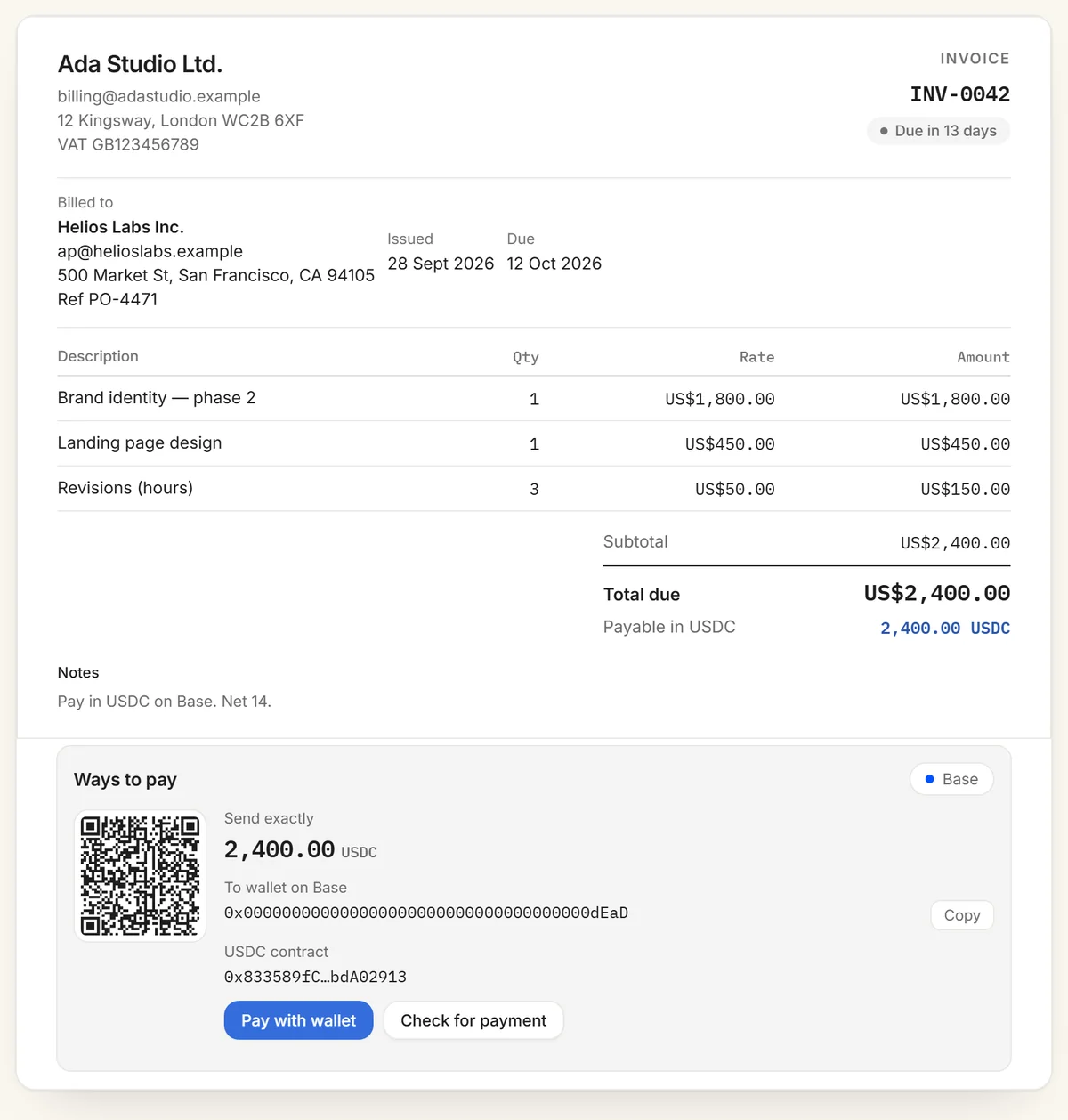
A sample crypto invoice: priced in dollars, payable as exactly 2,400 USDC on Base. (The address shown is a burn address, so don't pay it.)
After paying, either of you can press Check for payment. RivitPay scans recent blocks on that network for a matching token transfer to your address and links the transaction when it finds one. For payments in a native coin such as ETH, check the block explorer instead.
Priced in dollars, paid in tokens
When the token matches the invoice currency, such as USDC or USDT on a USD invoice or EURC on a euro invoice, the amount is exactly 1:1 and never moves. For any other pairing, such as a USD invoice paid in ETH or a pound invoice paid in USDC, RivitPay converts at the live market price, and the token amount updates to the current rate whenever the invoice is opened. If you need a fixed amount, invoice in the currency your stablecoin tracks.
Fees
RivitPay charges nothing for crypto invoices. There's no signup, no subscription and no cut of the payment. Your client pays the network's transaction fee, which on networks like Base, Arbitrum, Optimism and Polygon is usually a small fraction of what the same transfer costs on Ethereum mainnet. If you'd rather receive card payments in your bank account, see pricing for RivitPay's free account.
Records and taxes
Keep three things for every crypto payment: the invoice (with its number), the transaction hash, and the value in your own currency on the day you were paid. In many countries, including the US, crypto received for work is taxed as income at its value when you receive it, and selling it later can create a separate gain or loss. Rules differ by country, so check with an accountant. Stablecoins make this simplest, because the value on the day matches the invoice. Our guide to getting paid in USDC covers the practical side.
Staying safe
Send a test first for large invoices. A small transfer confirms the address and network before the full amount moves.
Confirm the network. USDC on Base and USDC on Ethereum are different tokens on different chains. The invoice names exactly one.
Beware of changed addresses. If someone emails your client "new payment details", they should confirm with you directly first. Invoice fraud relies on that email being trusted.
Crypto payments are final. There are no chargebacks. That protects you from reversed payments, but a mistake can only be fixed by the recipient sending funds back.
Crypto and bank on one invoice
Some clients can pay in crypto and some can't. An optional bank-transfer block adds your account details alongside the crypto payment methods, so every client has a way to pay. If you're only invoicing in ordinary currency, use the free invoice generator, which is the same tool with bank details in place of the crypto payment section.
Frequently asked questions
What is a crypto invoice?
A crypto invoice is a payment request settled in cryptocurrency instead of by bank transfer. It lists line items and a total priced in an ordinary currency, then states the exact token amount, the network and the wallet address to pay, so a client can pay in USDC, USDT, DAI or a native coin like ETH.
Is the crypto invoice generator free?
Yes. It's completely free, with no signup, no account and no fee on payments. Invoices are built in your browser and never stored on a server. Your client pays only the network's transaction fee.
Which tokens and networks are supported?
17 tokens across Ethereum, Base, Arbitrum, Optimism, Polygon, BNB Chain and Avalanche: the stablecoins USDC, USDT, DAI, PYUSD, EURC, TUSD, USDP, FRAX, LUSD and GUSD, plus WETH, WBTC, cbBTC and the native coins ETH, POL, BNB and AVAX. Availability varies by network.
Do payments pass through RivitPay?
No. Payments go straight from your client's wallet to yours. The invoice carries your address and an EIP-681 payment QR code, and funds never touch RivitPay.
How does my client pay the invoice?
Three ways: scan the QR code with a mobile wallet, press Pay with wallet to send from a browser wallet like MetaMask, or copy the address and exact amount into any wallet. A built-in check then looks for the incoming transfer on the network.
What happens if my client sends on the wrong network?
The invoice names one network, and the QR code and wallet button both carry its chain ID, which prevents most wrong-network mistakes. If a client sends manually, they should confirm the network label on the invoice first.
Do you store my invoices or wallet address?
No. Invoices live in your browser and inside the share link itself. RivitPay has no database of invoices or wallet addresses.