Create a professional invoice in about a minute. This free online invoice generator needs no signup and no account, puts no watermark on the PDF, and has no limit on how many invoices you make. Fill in your details on the left and the invoice builds itself on the right, exactly as your client will see it. When it looks right, download a PDF or copy a share link.
How to create an invoice in five steps
Add your business details. Your name or company, email, address and tax ID if you have one. Drop in a logo, or switch on auto-fill and RivitPay looks up your name, logo and address from your company website.
Add who you're billing. The client's name, email and address, plus a purchase order or reference number if they gave you one. Larger clients often can't pay an invoice that doesn't quote their PO.
Number and date it. Give the invoice a unique number, set the issue date, and choose a due date. The due date is what makes an invoice late, so always set one.
List what you're charging for. One line per product or service, each with a quantity and a rate. Add a discount or tax under More options and the totals update as you type.
Say how you want to be paid, then send it. Enter your bank details under Payment, add any terms in the notes, then download the PDF or copy a share link for your client.
What to include on an invoice
Most invoices that get paid late are missing something the client's accounts team needs. A complete invoice has:
The word "Invoice" and a unique invoice number, so it can be filed and referenced.
Issue date and due date. "Due on receipt" is valid, but a specific date is clearer.
Your details: business name, address, email and, where it applies, your VAT, GST or business number.
Your client's details: their legal name and billing address, and a PO number if they use them.
Itemised charges: a description, quantity and rate for each line, so nothing needs explaining.
Subtotal, tax, discounts and the total due, all in one currency.
Payment instructions: account holder, bank, account number or IBAN, and routing, sort or SWIFT code. International clients need the SWIFT/BIC.
Terms: when payment is due and what happens if it's late.
RivitPay lays all of this out for you and does the arithmetic, so the only thing you have to get right is the content.
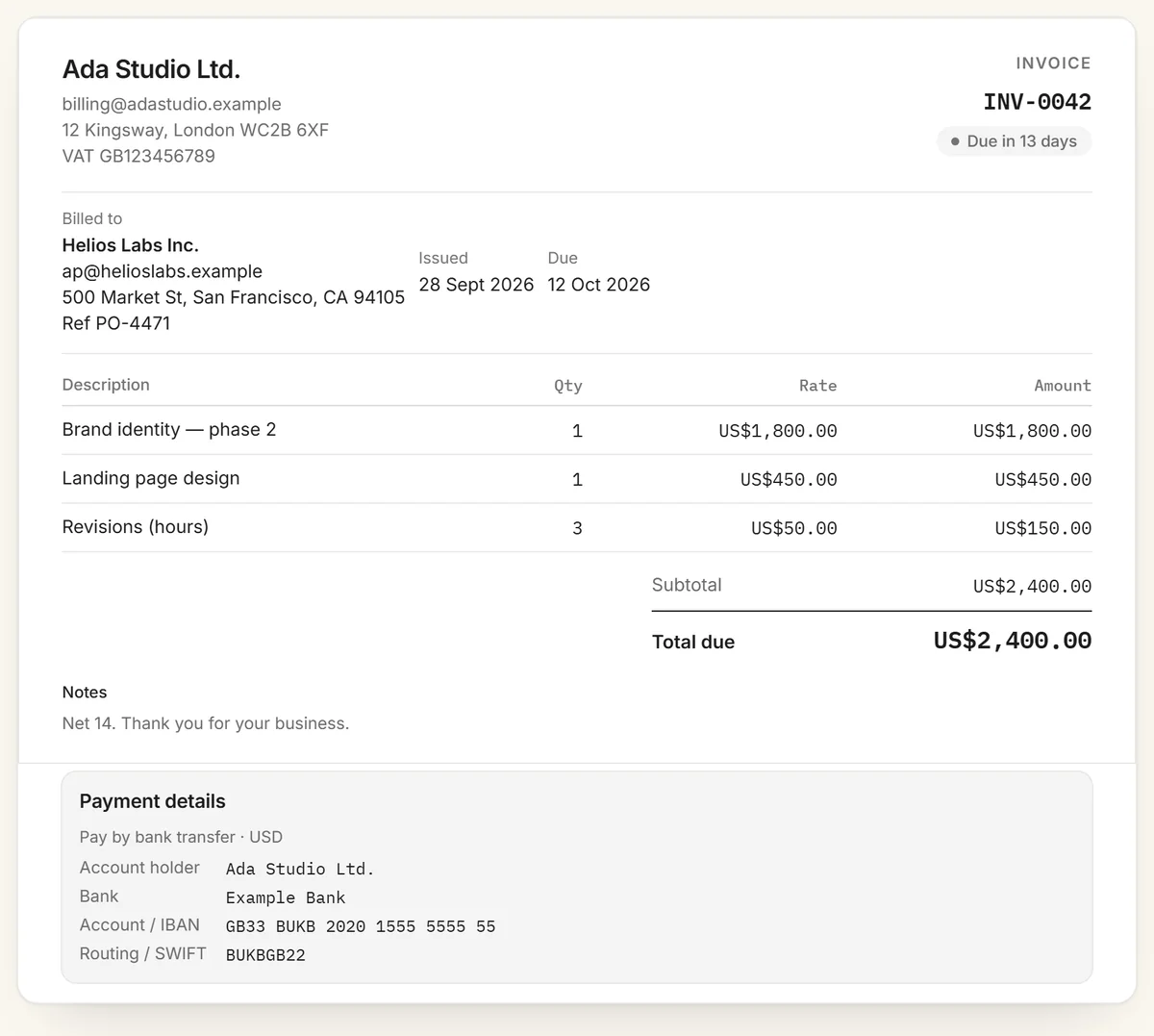
A sample invoice made with the free invoice generator. It's numbered, dated, itemised, and tells the client exactly where to pay.
Invoice numbers that stay in order
Invoice numbers must be unique and should run in sequence. Tax authorities in many countries expect them to, and it makes gaps easy to spot. Common formats are a plain sequence (INV-001, INV-002), a year prefix (2026-001) or a client prefix (ACME-001). Pick one and keep it. Never reuse a number, even for a cancelled invoice. Issue a credit note instead and move on to the next number. The invoice number generator sets up a format and tells you the next number.
Payment terms and due dates
Payment terms tell your client how long they have to pay. "Net 30" means payment is due 30 days after the invoice date, and "Net 14" means 14 days. In practice, shorter terms get paid faster, and nobody actually pays in 30 days anyway, so there's little reason to default to Net 30 for small jobs. Put the terms in the notes field, for example "Net 14. Late payments accrue 2% monthly", and make sure the due date on the invoice matches. In some places a late invoice has legal backing: freelance payment laws now set deadlines and penalties for late payers.
Invoicing in 45 currencies
Price an invoice in any of 45 currencies, including US dollars, euros, pounds sterling, Canadian and Australian dollars, Indian rupees, Singapore dollars, UAE dirhams, Nigerian naira and Brazilian reais. The currency you choose formats every figure on the document, so an invoice to an overseas client reads naturally to them. Keep to one currency per invoice. For clients abroad, include your IBAN and SWIFT/BIC and agree up front who pays transfer fees. Our guide to getting paid across borders covers the rest.
Sending it: PDF or share link
Download a PDF to attach to an email or upload to a client portal. Or copy a share link: your client opens it in any browser and sees the finished invoice, ready to print. The share link carries the whole invoice inside the URL itself, after the # sign, which browsers never send to a server. So there is no database, and nothing about your invoice is stored or sent anywhere. Your draft is saved in your own browser, so you can close the tab and pick up where you left off.
Invoice or receipt?
An invoice asks to be paid, and a receipt proves that you were. You send the invoice before payment, with a due date and payment instructions. A receipt comes after, showing the amount received, the date and the payment method. Some clients ask for both, so keep the invoice number on the receipt to tie them together. The free receipt generator makes one in the same way, marked as paid.
Invoice templates
Prefer a file you can edit in Word, Excel or Google Docs? Download a free freelance invoice template for hourly and project work, or a contractor invoice template with labor, materials and equipment on separate lines. Each one also opens here, already filled in with example lines, so you can finish it online and download the PDF. Pricing a job before you start? The quote & estimate generator turns an accepted estimate into an invoice in one click.
When you'll want a free account
The generator is all many freelancers ever need. If you send invoices regularly, a free RivitPay account adds what a PDF can't do: it tells you when your client opens the invoice, sends polite automatic reminders when it's overdue, repeats recurring invoices on schedule, and puts a Pay button on every invoice so clients can pay by card straight into your own Stripe account. Invoicing stays free, and online payments carry no RivitPay fee on your first $5,000 collected. The pricing page has the details.
Invoicing in crypto
If a client wants to pay in stablecoins, use the crypto invoice generator. It's the same invoice, with a payment QR code, one-click wallet payment and an on-chain payment check in place of bank details. What is a crypto invoice? explains how it works.
Frequently asked questions
Is this invoice generator really free?
Yes. It's completely free with no signup, no account and no watermark. There's no limit on how many invoices you create, and the PDF is yours to send.
Do I need an account?
No. Everything runs in your browser, and your draft is saved on your own device so you can come back to it. A free account is optional and adds tracking, reminders and card payments.
How do I make an invoice?
Add your business details, your client's details, and your line items with quantities and rates. Add tax or a discount if you need them, enter your bank details so the client knows where to pay, then download the PDF or copy a share link.
What should an invoice include?
A unique invoice number, issue and due dates, your business name and address, your client's name and address, an itemised list of charges with quantities and prices, any tax, the total due, and clear payment instructions such as bank account details.
Can I add my logo and use my own currency?
Yes. Upload a logo or auto-fill it from your website, and price the invoice in any of 45 currencies including USD, EUR, GBP, CAD, AUD and INR.
How do I send the invoice to my client?
Download the PDF and attach it to an email, or copy the share link. Your client opens the link in any browser and can print or save the invoice themselves.
Is my invoice data stored anywhere?
No. Invoices are built entirely in your browser and are never uploaded. A share link encodes the invoice inside the URL itself, so there is no database.
Can I invoice in cryptocurrency?
Yes. The crypto invoice generator adds stablecoin payment with a scannable QR code, and can show bank details alongside it.